> ## Documentation Index
> Fetch the complete documentation index at: https://documentation.onesignal.com/llms.txt
> Use this file to discover all available pages before exploring further.
# Apple App Privacy Requirements
> Understand how to accurately disclose your use of OneSignal in your iOS app to comply with Apple's App Privacy requirements. Learn which data types OneSignal collects and how to report them in App Store Connect.
Starting December 8, 2020, Apple requires a [privacy disclosure for all new apps and app updates](https://developer.apple.com/app-store/app-privacy-details). You must complete the privacy questionnaire in the App Privacy section of [App Store Connect](https://appstoreconnect.apple.com). Apple's official instructions are [available here](https://help.apple.com/app-store-connect/#/dev1b4647c5b).
As OneSignal is a third-party service, it is your responsibility to accurately disclose what data you collect and how it’s used through OneSignal.
By default, OneSignal collects select **in-app purchase data (Consumable)** and **usage data** such as session activity and notification clicks. If you collect additional information via **Tags**, **Outcomes**, or **custom integrations**, you must disclose that as well.
## Data types and their relevance to OneSignal
Use the following table to determine which data types you must disclose when using OneSignal:
✅ = Required when using OneSignal
💡 = May be required, depending on configuration
❌ = Not required when using OneSignal
| Data Type | Required? |
| -------------------- | -------------------------------------------------------------------------------------------------------------------------------------------------------------------------------------- |
| **Contact Info** | 💡 If you collect personal identifiers (e.g., name, email) using Tags or Outcomes |
| **Health & Fitness** | 💡 If you collect health data via custom tags or Outcomes |
| **Financial Info** | 💡 If you collect financial data through tags or Outcomes |
| **Location** | 💡 Only if your app requests and collects location data, and sends it to OneSignal |
| **Sensitive Info** | 💡 If you collect sensitive user data (e.g., race, politics, biometrics) via tags or Outcomes |
| **Contacts** | 💡 If you upload address books or contacts via Tags |
| **User Content** | 💡 If you collect user-generated content through OneSignal |
| **Browsing History** | ❌ Not collected |
| **Search History** | ❌ Not collected |
| **Identifiers** | ✅ OneSignal assigns a unique OneSignal ID for each user (not linked to identity by default).
💡 If you link other IDs (e.g., email, alias), disclosure requirements may change. |
| **Purchases** | ✅ Consumable in-app purchase events are collected |
| **Usage Data** | ✅ Session counts, durations, and notification interactions are collected |
| **Diagnostics** | 💡 OneSignal does not collect crash or energy logs, but does collect metadata like device type, OS, network state, etc. |
## Required data disclosures in App Store Connect
### Type: Purchases
If your app includes in-app purchases, you must report collection of **‘Purchases’** data.
 #### Purchase History
Mark ‘Analytics’ as a minimum. This enables OneSignal to provide dashboard features like Segments and Outcomes.
#### Purchase History
Mark ‘Analytics’ as a minimum. This enables OneSignal to provide dashboard features like Segments and Outcomes.
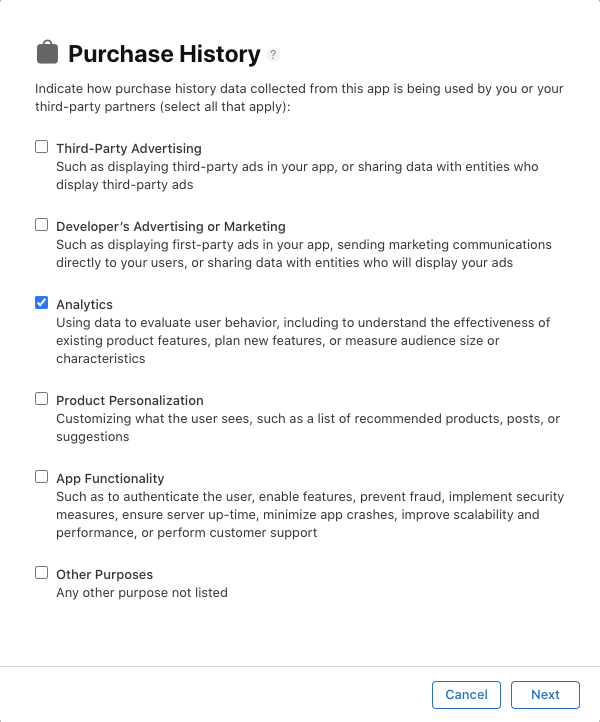 If you use OneSignal for other purposes (e.g., personalization or app functionality), be sure to select those as well.
#### Linked to user identity?
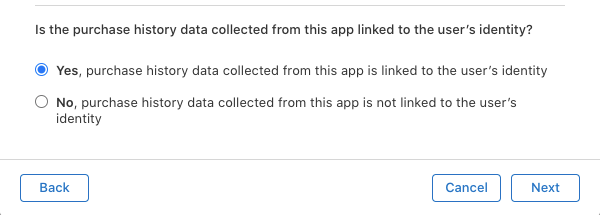
If you're only using OneSignal's anonymous IDs and don’t associate them with identifiable users, you can select **‘No’**.
If you link user data (e.g., email or name) via your backend or third-party tools, select **‘Yes’**.
If you use OneSignal for other purposes (e.g., personalization or app functionality), be sure to select those as well.
#### Linked to user identity?
If you're only using OneSignal's anonymous IDs and don’t associate them with identifiable users, you can select **‘No’**.
If you link user data (e.g., email or name) via your backend or third-party tools, select **‘Yes’**.
 #### Used for tracking?
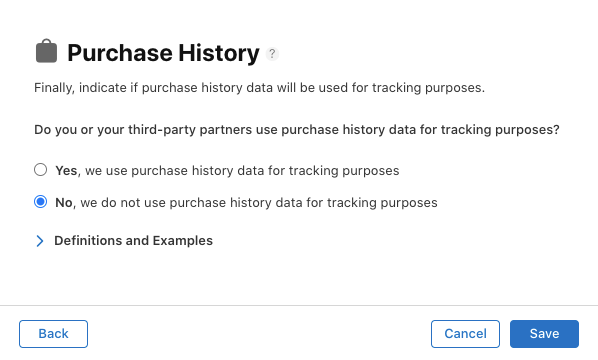
OneSignal does not track users across other apps. Select ‘No’ unless you use third-party tools or integrations that perform tracking.
#### Used for tracking?
OneSignal does not track users across other apps. Select ‘No’ unless you use third-party tools or integrations that perform tracking.
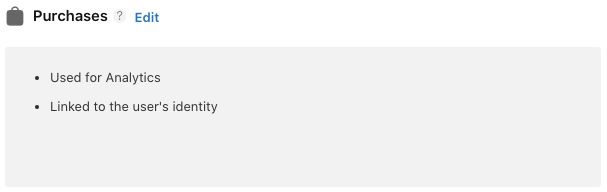
 After saving, you should see a summary like:
 ### Type: Usage Data – Product Interaction
You must disclose collection of **‘Product Interaction’** under **Usage Data**.
### Type: Usage Data – Product Interaction
You must disclose collection of **‘Product Interaction’** under **Usage Data**.
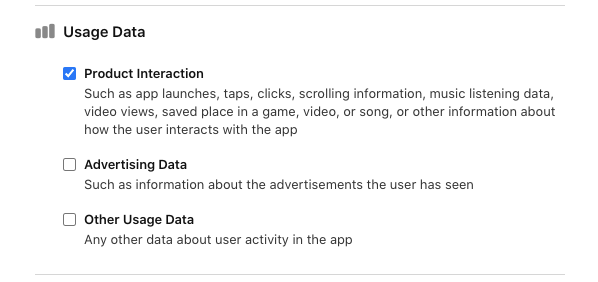 #### Product Interaction
Select **‘Analytics’** to reflect how OneSignal uses this data in Segments and Outcomes.
#### Product Interaction
Select **‘Analytics’** to reflect how OneSignal uses this data in Segments and Outcomes.
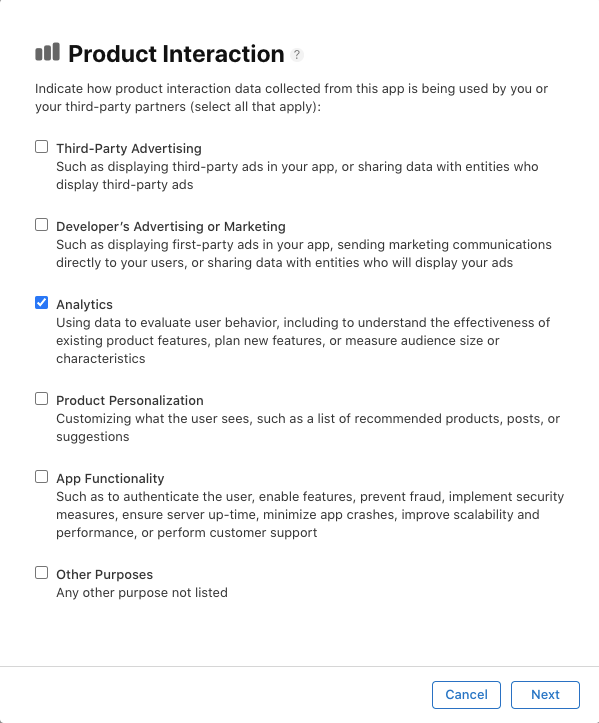 If you use this data for other purposes, such as app functionality or personalization, include those as well.
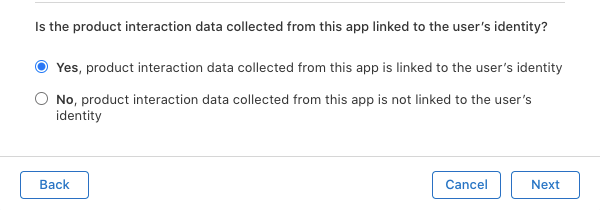
#### Linked to user identity?
Same guidance as with Purchases — if anonymous, select ‘No’. If linked via user ID or contact info, select ‘Yes’.
If you use this data for other purposes, such as app functionality or personalization, include those as well.
#### Linked to user identity?
Same guidance as with Purchases — if anonymous, select ‘No’. If linked via user ID or contact info, select ‘Yes’.
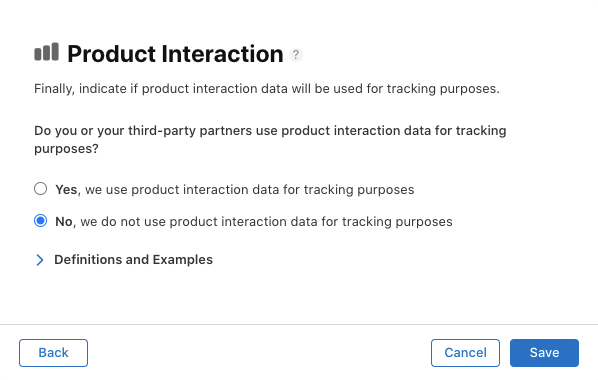
 #### Used for tracking?
OneSignal does not use this data for tracking across apps. Select ‘No’ unless other SDKs or integrations do.
#### Used for tracking?
OneSignal does not use this data for tracking across apps. Select ‘No’ unless other SDKs or integrations do.
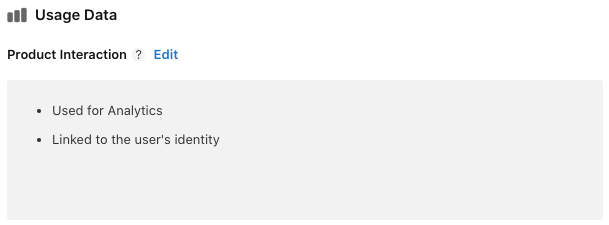
 You should then see this summary:
 ### Final review
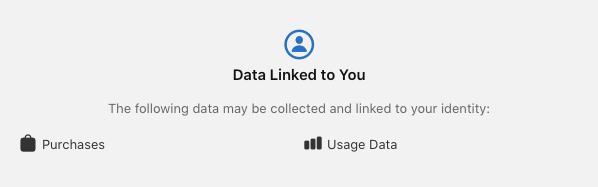
After completing all sections, Apple will show a preview of your app’s privacy disclosure. If you correctly selected Purchases and Usage Data, it should resemble the following:
### Final review
After completing all sections, Apple will show a preview of your app’s privacy disclosure. If you correctly selected Purchases and Usage Data, it should resemble the following:
 ## Ongoing compliance
If your data collection practices change — for example, if you add new tags, link identifiers, or update your SDK version — return to App Store Connect and update your disclosures accordingly.
***
## Ongoing compliance
If your data collection practices change — for example, if you add new tags, link identifiers, or update your SDK version — return to App Store Connect and update your disclosures accordingly.
***