> ## Documentation Index
> Fetch the complete documentation index at: https://documentation.onesignal.com/llms.txt
> Use this file to discover all available pages before exploring further.
# Subscriptions
> Manage Subscriptions across mobile push, web push, email, and SMS in OneSignal. Covers properties, statuses, and how to update or migrate them.
## Overview
A **Subscription** is a single destination where a user can receive messages: an email address, a phone number, a web browser, or an app installed on a device. Each Subscription belongs to one user at a time and tracks its own subscription status.
A user can have multiple Subscriptions (up to 20), including multiple of the same type. A phone and a tablet are two Mobile Subscriptions; a work and a personal email address are two Email Subscriptions. Use the [External ID](./users#external-id) to link all of a user's Subscriptions to the same user.
When a 21st Subscription is added, OneSignal removes the External ID from the oldest Subscription (based on last session) and assigns it a new OneSignal ID, effectively creating a new anonymous user for the inactive Subscription.
However, OneSignal ensures at least 3 Email and 3 SMS Subscriptions (if applicable) are retained.
See [Users](./users) for details.
Each Subscription can receive messages from one or more **channels**:
| Subscription type | Channels it can receive |
| ----------------- | --------------------------------------------------------------- |
| **Email** | Email messages |
| **SMS** | SMS, MMS, and RCS messages |
| **Web Push** | Web push notifications |
| **Mobile** | Mobile push notifications, In-app messages, and Live Activities |
Most Subscription types carry a single channel. Mobile Subscriptions carry three, and each channel behaves independently. For example, a user who declines the push permission cannot receive push notifications, but their Mobile Subscription can still receive in-app messages. See [Subscription statuses](#subscription-statuses) for details.
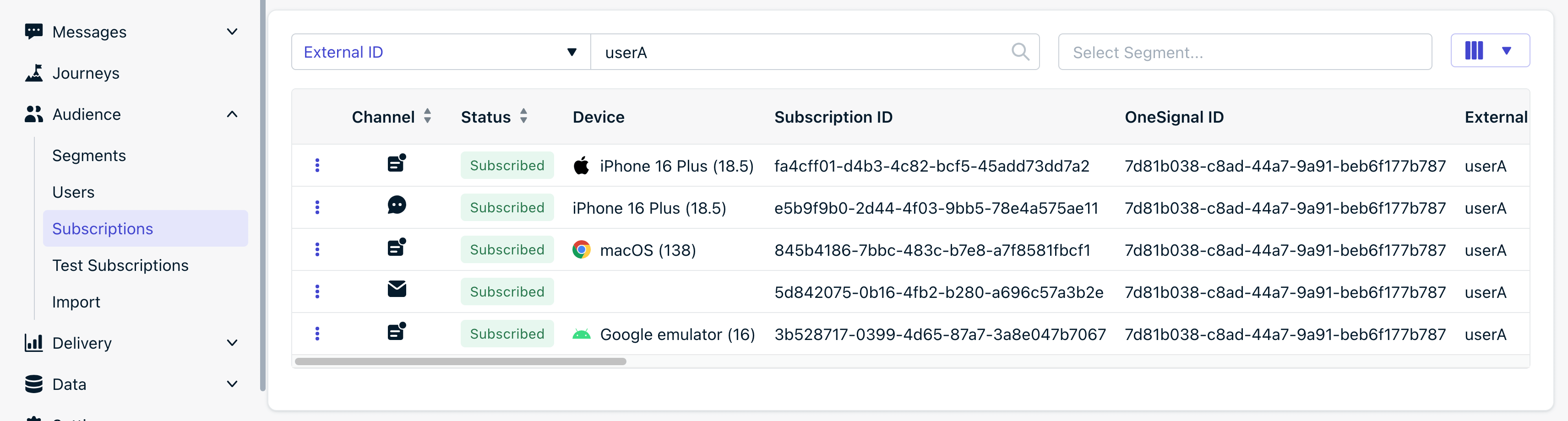
In the image above, "userA" has 5 Subscriptions:
1. **Mobile** (iOS) created after installing the iOS app. Call `OneSignal.login` to set the External ID and link the Subscription to the user.
2. **SMS** created after the phone number was provided within the iOS app. See [SMS Subscriptions](#sms-subscriptions) below for details.
3. **Web Push** created after subscribing to push on the website. Can receive web push notifications.
4. **Email** created after the email address was provided. For sending email messages.
5. **Mobile** (Android) created after installing the Android app. Can receive push notifications, in-app messages, and Live Activities.
***
## Subscription properties
Properties that identify the Subscription and control delivery:
| Property | Description |
| ----------------------- | ----------------------------------------------------------------------------------------------------------------------------------------------------------------------------------------------------------------------------------------------------------------------------------------------------------------------------- |
| **Subscription ID** | UUID representing this specific Subscription. |
| **Type** | `Email`, `SMS`, `Web Push`, or `Mobile` (iOS, Android, etc.). Determines which [channels](#overview) the Subscription can receive. |
| **Subscription Status** | Indicates whether the Subscription can receive messages on a channel. See [Subscription statuses](#subscription-statuses). |
| **Push Token** | Platform token used for push delivery (e.g., APNs or FCM). Only for Push Subscriptions. - **iOS Push APNs token format**: 64 characters, hexadecimal characters only (0-9,a-f). - **Android Push FCM token format**: Typically 163 characters, alphanumeric characters, may contain hyphens, colons and underscore. |
| **Email** | Only set for Email Subscriptions. |
| **Phone Number** | Only set for SMS Subscriptions. Must be in [E.164 format](https://en.wikipedia.org/wiki/E.164). |
| **Device** | The device model the Subscription was created with. For example, `armv81` for web push browsers on Android devices. |
| **App Version** | From SDK: Android `versionCode`, iOS `CFBundleShortVersionString`. |
| **SDK Version** | Version of the OneSignal SDK used. See [GitHub > SDKs (select your SDK) > Releases](https://github.com/OneSignal/sdks). |
Activity tracked on the Subscription:
| Property | Description |
| ------------------ | ------------------------------------------------------------------------------------------------------------------------------------------------------------------------------------ |
| **Last Session** | Timestamp of the last session tracked by the OneSignal SDK. For Email/SMS, it's based on the most recent push Subscription. See [Sessions](./sessions) for how a session is counted. |
| **First Session** | Timestamp when the first Subscription for the user was created. See [Sessions](./sessions) for how a session is counted. |
| **Sessions** | Count of how many times the app/site was opened. See [Sessions](./sessions) for how a session is counted. |
| **Usage Duration** | Total time (in seconds) the Subscription was active on the app or site tracked by the OneSignal SDK. Only tracked when session exceeds 60s. |
| **IP Address** | Network location when using OneSignal SDKs. Not collected in the EU. See [Handling Personal Data](./handling-personal-data). |
Properties shown alongside each Subscription that belong to the **user**, and are shared across all of the user's Subscriptions:
| Property | Description |
| ------------------ | ----------------------------------------------------------------------------------------------------------------------- |
| **OneSignal ID** | UUID representing the user this Subscription belongs to. See [Users](./users). |
| **External ID** | Your custom user ID. Links multiple Subscriptions to the same user. |
| **Tags** | Custom key-value metadata. See [Tags](./add-user-data-tags). |
| **Language Code** | From the device at time of Subscription creation. See [Multi-language messaging](./multi-language-messaging). |
| **Timezone ID** | From the device at time of last interaction. |
| **Country** | Derived from IP address. |
| **Location Point** | Latitude/longitude if location tracking is enabled. See [Location-triggered notifications](./location-triggered-event). |
### Subscription statuses
A Subscription's status answers one question: **can this Subscription receive messages on a channel?** Subscriptions that can are **Subscribed**; Subscriptions that cannot are either **Unsubscribed** (they opted out or lost a valid token) or **Never Subscribed** (they never opted in). The details vary by channel:
| Status | Mobile | Web Push | Email | SMS |
| -------------------- | ------------------------------------------------------------------------------------------------------------------------------------------------------------------- | --------------------------------------------------------------------------------------------------------------- | --------------------------------------------------------------------------------------------------------------------------------------------------------------------------- | --------------------------------------------------------------------------------- |
| **Subscribed** | User granted push permission. With [iOS Provisional push](./ios-provisional-push-notifications), all iOS Subscriptions start as Subscribed. | User clicked "Allow" on the browser permission prompt. | Email address is valid and user has consented. | Phone number is valid and user has consented. |
| **Unsubscribed** | Cannot receive push, but **can still receive in-app messages**. See [Handling uninstalls & invalid tokens](#handling-uninstalls-unsubscribes--invalid-push-tokens). | Cannot receive push. See [Handling unsubscribes & invalid tokens](#handling-unsubscribes--invalid-push-tokens). | User opted out via [unsubscribe link](./unsubscribe-links-email-subscriptions). Can be [overridden](./email-messaging#send-to-unsubscribed-users) for transactional emails. | User replied "STOP" or other [opt-out keyword](./sms-consent-keyword-management). |
| **Never Subscribed** | User was never prompted or never granted permission. | N/A. A Web Push Subscription only exists after the user subscribes. | N/A | N/A |
Status applies per channel, not to the Subscription as a whole. A Mobile Subscription's status describes the **push** channel only: in-app messages are delivered whenever the user opens the app, regardless of push status, and Live Activities use their own per-activity tokens.
In the API, `invalid_identifier: true` means unsubscribed. Check `notification_types` for the specific reason.
***
### `notification_types`
Indicates the Subscription's ability to receive messages, including reasons for failures. Automatically updated via the frontend SDKs or manually via the API. Viewable via the [View User API](/reference/view-user) or [Export CSV](/reference/csv-export).
`1` or positive number = Subscribed.
* The Subscription can receive messages on this channel.
* Can be used with `enabled` property if you are enabling messages on behalf of the user. For push Subscriptions, a valid `token` must still be set to receive push notifications. See our SDK setup docs for details.
In the API, values above `1` only occur on **iOS**. On all other channels (Android, Huawei, Amazon, Web, Email, SMS), a subscribed Subscription is set to `1`; their failure states use the negative codes listed below.
On **iOS**, a positive `notification_types` value is a bitmask of the notification authorization options the user has granted. Add the bit values below to interpret a specific number. Any positive value means the Subscription is **Subscribed**.
| Bit value | Authorization option |
| --------- | ---------------------------------------------------------------------------------------------- |
| `1` | Badge |
| `2` | Sound |
| `4` | Alert |
| `8` | CarPlay |
| `16` | Critical Alert |
| `32` | Provides App Notification Settings |
| `64` | Provisional (quiet delivery, see [iOS Provisional push](./ios-provisional-push-notifications)) |
| `128` | Announcement (Siri "Announce Notifications", deprecated in iOS 15) |
| `256` | Time Sensitive |
For example, `47` = `32 + 8 + 4 + 2 + 1` = Provides App Notification Settings + CarPlay + Alert + Sound + Badge. Some values you may see:
* `32` = Provides App Notification Settings
* `43` = Provides App Notification Settings + CarPlay + Sound + Badge
* `45` = Provides App Notification Settings + CarPlay + Alert + Badge
* `47` = Provides App Notification Settings + CarPlay + Alert + Sound + Badge
* `64` = Provisional
* `80` = Provisional + Critical Alert
* `88` = Provisional + Critical Alert + CarPlay
* `91` = Provisional + Critical Alert + CarPlay + Sound + Badge
* `160` = Announcement + Provides App Notification Settings
`0`, `-99` = Never Subscribed.
* The Subscription has not subscribed to the channel yet.
`-2` = Unsubscribed (Opted Out).
* Set when `optOut()` is called via the SDK, or when `enabled` is set to `false` via the API.
* The Subscription cannot receive messages on this channel.
* To re-enable, call `optIn()`. See `optOut` / `optIn` / `optedIn` ([mobile](./mobile-sdk-reference#optout-optin-optedin) | [web](./web-sdk-reference#optout-optin-optedin)) for details.
`-3`, `-5` = Android `Support Library Error`.
* Add or update your app's [Android Support Library](https://developers.google.com/android/).
`-4`, `-8`, `-11`, `-12`, `-29` = Android `Google Play Services Library Error`.
* Check the logcat. See [Getting a Debug Log](./capturing-a-debug-log).
* Upgrade your [Google Play Services Library](https://developers.google.com/android/) in your app and check the app's logcat for Google Play Services errors. See [Getting a Debug Log](./capturing-a-debug-log).
`-6` = Android `Invalid Google Project Number`.
* The FCMv1 Sender ID doesn't match the original in which this `token` belongs. Check the app's logcat. See [Getting a Debug Log](./capturing-a-debug-log).
`-7`, `-9` = Android `Outdated Google Play Services App`.
* Update or enable the Google Play Services app on the device.
`-10` = Not Subscribed.
* Push Subscription uninstalled app or unsubscribed in device settings.
* Web push blocked notifications, cleared all data and workers.
`-25`, `-26`, `-27`, `-28` = Huawei `HMS PushKit Error`.
* Verify your HMS PushKit setup and check the device logs. See [Getting a Debug Log](./capturing-a-debug-log).
`-13` = iOS `missing_push_capability`.
* Review the SDK setup docs to make sure all steps are implemented. See [Channel setup](./channel-setup).
`-14`, `-16`, `-17`, `-30` = iOS `APNs Errors`.
* The device is having an issue connecting to APNs. Check the [Troubleshooting iOS](./mobile-troubleshooting) guide and [Getting a Debug Log](./capturing-a-debug-log).
`-15` = iOS `Simulator Error`.
* iOS Simulator requires iOS 16.4+. Use a different simulator or device.
`-18` = Never Prompted.
* The Subscription was never prompted to subscribe. This only tracks the required permission prompt and does not include in-app messages.
`-19` = Prompted But Never Answered.
* The Subscription was prompted but didn't provide an answer.
`-20`, `-21` = `temp_web_record`. Web push permission was revoked (`pushsubscriptionchange`).
`-22` = Manually Unsubscribed via dashboard.
* Permission was revoked.
`-23`, `-24` = Web `Service Worker Error`.
* See [Web SDK troubleshooting](./troubleshooting-web-push).
`-31` = Disabled via REST API.
`-98` = SMS Subscription awaiting double opt-in.
***
## Mobile Subscriptions
A Mobile Subscription is your app installed on an iOS, Android, Huawei, or Amazon device. It is created automatically when a user installs and opens your app with the OneSignal SDK, and it can receive three channels:
* Push notifications (requires push permission)
* In-app messages (delivered when the user opens the app, no permission required)
* Live Activities (iOS, requires the user to start an activity)
Each Mobile Subscription is tied to the device and push token it was created on. If your app is uninstalled and reinstalled on the same device, a new Subscription will be generated.
Call [`OneSignal.login`](./mobile-sdk-reference#login-external-id) each time the user opens the app to make sure the [External ID](./users#external-id) is set and the Subscription is linked to the user.
### Updating mobile Subscriptions
Update Mobile Subscription properties using the [OneSignal mobile SDK](./mobile-sdk-reference).
* [Prompt for push permissions](./prompt-for-push-permissions) and [observe permission/Subscription changes](./mobile-sdk-reference#addobserver-push-subscription-changes)
* [Login users](./mobile-sdk-reference#login-external-id) to set External ID and Aliases
* Add [Tags](./add-user-data-tags)
* Set [Language](./multi-language-messaging)
You can update tags, language, and some other properties via the [CSV Import](./import) feature.
Mobile Subscriptions can be created and updated via the [Users](/reference/create-user) and [Subscriptions](/reference/create-subscription) APIs as well, but the mobile SDK is recommended for most use cases.
### Handling uninstalls, unsubscribes, & invalid push tokens
Mobile Subscriptions stop receiving push notifications if the user:
* Uninstalls the app
* Disables push in device settings and never reopens the app
* [Push token expires](./fcm-expired-token-faq)
In these cases, the Subscription status will be set to **Unsubscribed** when sending push notifications. See [When do push Subscription statuses update?](#when-do-push-subscription-statuses-update) for more details. Remember that an Unsubscribed Mobile Subscription can still receive in-app messages if the app is still installed.
* If the user re-installs the app on the same device or a new device, a new Subscription will be created and they need to re-subscribe to receive messages.
* If the user re-enables push in the device settings, the Subscription status will be set to **Subscribed** and the push token will be updated when they open the app.
* If the push token expires, the Subscription status and new push token will update when the user opens the app on the same device.
Track changes via:
* [Event Streams](./event-streams) - detect unsubscribes when sending push
* [Push reports](./push-notification-message-reports) - detect unsubscribes when sending push
* The SDK's [Subscription change listener](./mobile-sdk-reference#addobserver-push-subscription-changes) - detect unsubscribes when the user disables push in device settings then opens the app
***
## Web push Subscriptions
A Web Push Subscription is a specific browser profile on a specific device that has opted in to push from your website. A user who subscribes on Chrome desktop will not receive push on Chrome mobile unless they also subscribe from that mobile device, creating a separate Web Push Subscription. Two browsers on the same laptop are also separate Subscriptions.
New Web Push Subscriptions are created in these scenarios:
* User subscribes to your website by clicking "Allow" on the browser's system-level [native permission prompt](./permission-requests). This generates a unique push token and Subscription ID.
* User clears browser data (history, cache, cookies, local storage) and revisits your site. This results in a new unique Subscription ID being created.
Web push Subscription IDs will never change. However, new Subscription IDs will be created if the user clears browser data and returns to the site or subscribes on a different browser/browser profile.
Call [`OneSignal.login`](./web-sdk-reference#login-external-id) each time the user opens the site or within the [Subscription change listener](./web-sdk-reference#addeventlistener-push-subscription-changes) to make sure the [External ID](./users#external-id) is set and the Subscription is linked to the user.
### Updating web push Subscriptions
Update Web Push Subscription properties using the [OneSignal web SDK](./web-sdk-reference).
* [Prompt for push permissions](./permission-requests) and [observe permission/Subscription changes](./web-sdk-reference#addeventlistener-push-subscription-changes)
* [Login users](./web-sdk-reference#login-external-id) to set External ID and Aliases
* Add [Tags](./add-user-data-tags)
* Set [Language](./multi-language-messaging)
You can update tags, language, and some other properties via the [CSV Import](./import) feature.
Web Push Subscriptions cannot be created via the REST API. You can update them with the [Users](/reference/update-user) and [Subscriptions](/reference/update-subscription) APIs, but the web SDK is recommended for most use cases.
### Handling unsubscribes & invalid push tokens
Web Push Subscriptions stop receiving push notifications if the user:
* Clears browser data (history, cache, cookies, local storage)
* Disables push in the browser system settings
* [Push token expires](./fcm-expired-token-faq)
In these cases, the Subscription status will be set to **Unsubscribed** when sending push notifications. See [When do push Subscription statuses update?](#when-do-push-subscription-statuses-update) for more details.
* If the user returns to the site after clearing browser data, a new Subscription will be created and they will be automatically re-subscribed to receive messages if you have [auto-resubscribe enabled](./web-push-setup#auto-resubscribe).
* If the user re-enables push in the browser settings, the Subscription status will be set to **Subscribed** when they return to the site.
* If the push token expires, the Subscription status and new push token will update when the user returns to the site.
Chromium put out a [blog post](https://blog.chromium.org/2025/10/automatic-notification-permission.html?m=1) in October 2025, regarding a change that will **automatically revoke push permissions** for users with low site engagement who are being sent a high volume of notifications. The threshold for when a user is considered to have a [low engagement score](https://www.chromium.org/developers/design-documents/site-engagement/), appears to be about 30 days of inactivity. When revoked, the end user should receive a notification from Chrome directly.
Track changes via:
* [Event Streams](./event-streams) - detect unsubscribes when sending push
* [Push reports](./push-notification-message-reports) - detect unsubscribes when sending push
* The SDK's [Subscription change listener](./web-sdk-reference#addeventlistener-push-subscription-changes) - detect unsubscribes when the user disables push then returns to the site
***
## Email Subscriptions
An Email Subscription is a single email address used for email delivery. Storing an email address as a Subscription is different from setting it as a [Tag](./add-user-data-tags): only a Subscription can receive messages.
Create Email Subscriptions via:
1. SDK `addEmail` method or [email prompt](./permission-requests) - use these methods after calling `OneSignal.login` to set the External ID and link the Subscription to the user.
2. [Create user API](/reference/create-user) or [Create email API](/reference/email)
3. Dashboard [CSV Importer](./import) or manually add email addresses
Emails are unique per app. Deleting and re-adding the same email creates a new Subscription ID.
It is recommended to include the `external_id` when creating Email Subscriptions to link them to a [User](./users).
### Managing email Subscriptions
**Link to a user**
Make sure to set the `external_id` when creating Email Subscriptions to link them to a [User](./users).
* Using the SDK, call the `login` method before calling `addEmail` to set the `external_id` and link the Email Subscription to the user.
* Using the CSV Importer or REST API, set the `external_id` identifier with the email.
**Subscription statuses**
Newly created Email Subscriptions will automatically be set to **Subscribed** unless otherwise specified.
Email Subscriptions become unsubscribed when:
* The user opts out via the [unsubscribe link](./unsubscribe-links-email-subscriptions)
* You set `enabled` to `false` via the API
* You unsubscribe the Subscription in the dashboard via the options button
Email Subscriptions become resubscribed when:
* You set `enabled` to `true` via the API
* You subscribe the Subscription in the dashboard via the options button
If a user unsubscribes from emails, you can keep them as unsubscribed but send them important emails by [sending to unsubscribed emails](./email-messaging#send-to-unsubscribed-users).
***
## SMS Subscriptions
An SMS Subscription is a single phone number in [E.164 format](https://en.wikipedia.org/wiki/E.164) (e.g., `+14155551234`).
Create SMS Subscriptions via:
1. SDK `addSms` method or [SMS prompt](./permission-requests) - call `OneSignal.login` first to set the External ID and link the Subscription to the user.
2. [Create user](/reference/create-user) or [Create SMS](/reference/sms) API
3. Dashboard [CSV Importer](./import)
Phone numbers are unique per app. Re-adding after deletion creates a new Subscription ID.
Include the `external_id` when creating SMS Subscriptions to link them to a [User](./users).
### Managing SMS Subscriptions
**Link to a user**
Set the `external_id` when creating SMS Subscriptions to link them to a [User](./users).
* Using the SDK, call the `login` method before calling `addSms` to set the `external_id` and link the SMS Subscription to the user.
* Using the CSV Importer or REST API, set the `external_id` identifier with the phone number.
**Subscription statuses**
Newly created SMS Subscriptions are automatically set to **Subscribed** unless otherwise specified.
SMS Subscriptions become unsubscribed when:
* The user replies with "STOP" or another [opt-out keyword](./sms-consent-keyword-management)
* You set `enabled` to `false` via the API
* You unsubscribe the Subscription in the dashboard via the options button
SMS Subscriptions become resubscribed when:
* The user replies with "START" or another [opt-in keyword](./sms-consent-keyword-management)
* You set `enabled` to `true` via the API
* You resubscribe the Subscription in the dashboard via the options button
Re-subscribing an SMS Subscription without the user's consent violates carrier compliance rules (TCPA, CTIA) and can result in carrier filtering or account suspension.
***
## Importing or migrating Subscriptions
Import push tokens, email addresses, and phone numbers from another provider using:
* [Create user API](/reference/create-user)
* [Create Subscription API](/reference/create-subscription)
Import push tokens, emails, and phone numbers from another provider.
***
## Deleting Subscriptions
Subscriptions can be deleted for:
* Data privacy
* Cleaning up inactive records
Deleting a Subscription removes that destination only. The user and their other Subscriptions remain. See [Delete users](./delete-users) for the difference between deleting a Subscription and deleting an entire user.
Remove Subscriptions and user data for privacy or cleanup.
Subscriptions with no activity for 18+ months are automatically deleted on Free plans.
***
## Finding Subscriptions
The easiest way to find a Subscription is through the OneSignal dashboard. If you already know the user's External ID, email, or phone number, search for it directly in **Audience > Subscriptions**.
### Search by last active
If you don't know the user's ID, you can find your device by activity:
1. Open your app or site on the device you want to find. Make sure OneSignal is initialized (code actively running).
2. In the OneSignal dashboard, go to **Audience > Subscriptions**.
3. Sort by **Last Active** (arrow pointing up) to see the most recently active devices at the top.
### Verify it is your device
If multiple Subscriptions appear, use the **Displayed Columns** filter at the top-right to show additional columns that help identify your device:
| Column | What to check |
| --------------------- | -------------------------------------------------------------------------------------------------------------------------------------------------------------------- |
| **External ID** | Should match the ID in your database for this user. |
| **Last Active** | Should reflect the time you just opened the app or site. Refresh the page to update. |
| **First Session** | The first time the device subscribed. Useful if you just subscribed for the first time. |
| **IP Address** | If enabled, compare with your IP at [whatismyipaddress.com](https://whatismyipaddress.com/). See [Data collected by the SDK](./data-collected-by-the-onesignal-sdk). |
| **Tags**, **Country** | Helpful if you set a known tag like `user_name` or `email` on this device. |
| **Device** | Shows browser and version for web, or device model and OS version for mobile apps. |
### Find by segment tag
If you added a specific tag to the user (e.g., `user_name` or another identifier), you can create a [segment with the User Tag filter](./segmentation#creating-segments) to isolate that device.
### Find Subscription ID programmatically
For developers who need the Subscription ID directly from code:
1. Open your site in the browser profile that is subscribed to push.
2. Open the browser console (F12 or right-click > **Inspect** > **Console**).
3. Run: `OneSignal.User.PushSubscription.id`
4. The Subscription ID is logged to the console.
For mobile web, connect your Android device via USB and use `chrome://inspect/#devices` to open a remote console session.
Use the OneSignal SDK [User Data Methods](./mobile-sdk-reference) to log the Subscription ID to the console from Xcode or Android Studio.
***
## FAQ
### Why can't I find my Subscription in the dashboard?
The most common causes are:
* The OneSignal SDK is not initialized on the page or screen you are using.
* You are searching by the wrong ID type. Try searching by email, phone number, or Subscription ID instead.
* The Subscription was created in a different OneSignal app (e.g., staging vs. production).
### Why did my "unsubscribed" user receive an in-app message?
Subscription status applies per channel. A Mobile Subscription that is Unsubscribed from push can still receive in-app messages, because in-app delivery only requires the app to be installed and opened, not push permission. This is working as designed. See [Subscription statuses](#subscription-statuses).
### When do push Subscription statuses update?
Push Subscription statuses update through two mechanisms:
**1. When the user opens your app or site**
The OneSignal SDK checks whether the push token is valid and whether notification permissions are still granted, then updates the Subscription status immediately.
For example, if a user disables push notifications in their device settings and then reopens your app, the SDK detects the change and marks the Subscription as **Unsubscribed** right away.
You can capture these changes with the SDK's Subscription Observer ([mobile](./mobile-sdk-reference#addobserver-push-subscription-changes) | [web](./web-sdk-reference#addeventlistener-push-subscription-changes)) to sync status to your own database.
**2. When you send push notifications**
If a user uninstalls your app, clears browser data, or disables push **and never returns**, OneSignal cannot detect the change until you send a notification. The push service (FCM, APNs, HMS) reports the token as invalid, and OneSignal marks the Subscription as **Unsubscribed**.
This detection typically takes 2 or more messages because the push service does not immediately reject an invalid token:
| Send | What happens |
| ---------- | ----------------------------------------------------------------------------------------------------------------------------------------------------------- |
| Message 1 | Delivered to device. User then unsubscribes in device settings or uninstalls the app. |
| Message 2 | Push service accepts the message but the device does not receive it. OneSignal reports "Delivered" because the push service has not rejected the token yet. |
| Message 3 | Push service rejects the token. OneSignal marks the Subscription as **Unsubscribed**. |
| Message 4+ | OneSignal does not attempt delivery to this Subscription. |
Use [Event Streams](./event-streams) to detect unsubscribes in real time when sending messages.
If you go long periods without sending to all users, unsubscribes accumulate silently and appear as a large spike when you resume sending. Send to all users at least once or twice a month to detect unsubscribes gradually. See [FCM expired token FAQ](./fcm-expired-token-faq) for more on unsubscribe spikes.
Apple delays unsubscribe reporting by 14+ days. To protect user privacy, Apple does not immediately report uninstalls or permission revocations. If a user opens your app after disabling push, OneSignal detects the change instantly via the SDK. If the user never opens the app again, it may take several weeks for Apple to report the invalid token after you send notifications.
See [Apple Forum](https://developer.apple.com/forums/thread/670868) and [Technical Note](https://developer.apple.com/library/archive/technotes/tn2265/_index.html#//apple_ref/doc/uid/DTS40010376-CH1-TNTAG34) for details. Use the dashboard or API to [delete old subscriptions](./delete-users) to keep your audience clean.
### A Subscription was deleted and a new one was created. Why did the user's data come back after they logged in?
When `OneSignal.login` is called with a user's [External ID](./users#external-id), OneSignal links the new Subscription to their existing user profile. If a Subscription was deleted and a new one was created (for example, after a reinstall), calling `login` with the same External ID re-associates the new Subscription with the user's profile. This is working as designed.
Note that there is a difference between deleting a **Subscription** (removes that destination but the user profile remains) and deleting the **entire user** (removes all Subscriptions and user data). Deleting a Subscription keeps the user profile as long as the user has an External ID or [alias](./aliases). If a user has no External ID and no aliases, deleting their last Subscription also deletes the user profile automatically. See [User lifecycle](./users#user-lifecycle) and [Delete users](./delete-users) for details.
### If a user turns off notifications in their device settings and never opens the app again, what happens?
The Subscription remains marked as **Subscribed** in OneSignal until you send a notification to that device. After 2 or more send attempts, the push service reports the token as invalid and OneSignal marks the Subscription as **Unsubscribed**. See [When do push Subscription statuses update?](#when-do-push-subscription-statuses-update) above for the full sequence.
***
## Related pages
The OneSignal user model, aliases, and how users relate to Subscriptions.
Mark a User as a test user to validate message delivery before sending to production.
Remove Subscriptions and user data for privacy or cleanup.
Import push tokens, emails, and phone numbers from another provider.
 In the image above, "userA" has 5 Subscriptions:
1. **Mobile** (iOS) created after installing the iOS app. Call `OneSignal.login` to set the External ID and link the Subscription to the user.
2. **SMS** created after the phone number was provided within the iOS app. See [SMS Subscriptions](#sms-subscriptions) below for details.
3. **Web Push** created after subscribing to push on the website. Can receive web push notifications.
4. **Email** created after the email address was provided. For sending email messages.
5. **Mobile** (Android) created after installing the Android app. Can receive push notifications, in-app messages, and Live Activities.
***
## Subscription properties
Properties that identify the Subscription and control delivery:
| Property | Description |
| ----------------------- | ----------------------------------------------------------------------------------------------------------------------------------------------------------------------------------------------------------------------------------------------------------------------------------------------------------------------------- |
| **Subscription ID** | UUID representing this specific Subscription. |
| **Type** | `Email`, `SMS`, `Web Push`, or `Mobile` (iOS, Android, etc.). Determines which [channels](#overview) the Subscription can receive. |
| **Subscription Status** | Indicates whether the Subscription can receive messages on a channel. See [Subscription statuses](#subscription-statuses). |
| **Push Token** | Platform token used for push delivery (e.g., APNs or FCM). Only for Push Subscriptions.
In the image above, "userA" has 5 Subscriptions:
1. **Mobile** (iOS) created after installing the iOS app. Call `OneSignal.login` to set the External ID and link the Subscription to the user.
2. **SMS** created after the phone number was provided within the iOS app. See [SMS Subscriptions](#sms-subscriptions) below for details.
3. **Web Push** created after subscribing to push on the website. Can receive web push notifications.
4. **Email** created after the email address was provided. For sending email messages.
5. **Mobile** (Android) created after installing the Android app. Can receive push notifications, in-app messages, and Live Activities.
***
## Subscription properties
Properties that identify the Subscription and control delivery:
| Property | Description |
| ----------------------- | ----------------------------------------------------------------------------------------------------------------------------------------------------------------------------------------------------------------------------------------------------------------------------------------------------------------------------- |
| **Subscription ID** | UUID representing this specific Subscription. |
| **Type** | `Email`, `SMS`, `Web Push`, or `Mobile` (iOS, Android, etc.). Determines which [channels](#overview) the Subscription can receive. |
| **Subscription Status** | Indicates whether the Subscription can receive messages on a channel. See [Subscription statuses](#subscription-statuses). |
| **Push Token** | Platform token used for push delivery (e.g., APNs or FCM). Only for Push Subscriptions. ### Find Subscription ID programmatically
For developers who need the Subscription ID directly from code:
### Find Subscription ID programmatically
For developers who need the Subscription ID directly from code: