

cURL
curl --request DELETE \
  --url https://api.onesignal.com/apps/{app_id}/segments/{segment_id} \
  --header 'Authorization: <authorization>'
import Onesignal from '@onesignal/node-onesignal';
const configuration = Onesignal.createConfiguration({
restApiKey: 'YOUR_REST_API_KEY',
});
const apiInstance = new Onesignal.DefaultApi(configuration);
// string | The OneSignal App ID for your app. Available in Keys & IDs.
const appId: string = "YOUR_APP_ID";
// string | The segment\'s unique identifier. In the dashboard, go to Audience > Segments, open the segment\'s options menu, and select Copy segment ID. You can also get it from the View Segments API or the segment\'s URL in the dashboard.
const segmentId: string = "d6c5a3e1-9f17-44a1-9d10-7c0e4a2b1c8e";
try {
const response = await apiInstance.deleteSegment(appId, segmentId);
console.log(response);
} catch (e) {
if (e instanceof Onesignal.ApiException) {
// `e.errorMessages` flattens any error-envelope shape to a `string[]`;
// the raw parsed body remains on `e.body`.
console.error("deleteSegment failed: HTTP " + e.code, e.errorMessages);
} else {
throw e;
}
}import onesignal
from onesignal.api import default_api
from onesignal.models import *
from pprint import pprint
# See configuration.py for a list of all supported configuration parameters.
# Some of the OneSignal endpoints require ORGANIZATION_API_KEY token for authorization, while others require REST_API_KEY.
# We recommend adding both of them in the configuration page so that you will not need to figure it out yourself.
configuration = onesignal.Configuration(
rest_api_key = "YOUR_REST_API_KEY", # App REST API key required for most endpoints
organization_api_key = "YOUR_ORGANIZATION_API_KEY" # Organization key is only required for creating new apps and other top-level endpoints
)
# Enter a context with an instance of the API client
with onesignal.ApiClient(configuration) as api_client:
# Create an instance of the API class
api_instance = default_api.DefaultApi(api_client)
app_id = "YOUR_APP_ID" # The OneSignal App ID for your app. Available in Keys & IDs.
segment_id = "d6c5a3e1-9f17-44a1-9d10-7c0e4a2b1c8e" # The segment's unique identifier. In the dashboard, go to Audience > Segments, open the segment's options menu, and select Copy segment ID. You can also get it from the View Segments API or the segment's URL in the dashboard.
try:
# Delete Segment
api_response = api_instance.delete_segment(app_id, segment_id)
pprint(api_response)
except onesignal.ApiException as e:
print("Exception when calling DefaultApi->delete_segment: %s\n" % e)
print("Status Code: %s" % e.status)
print("Response Body: %s" % e.body)<?php
require_once(__DIR__ . '/vendor/autoload.php');
// Configure Bearer authorization: rest_api_key
$config = onesignal\client\Configuration::getDefaultConfiguration()
->setRestApiKeyToken('YOUR_REST_API_KEY')
->setOrganizationApiKeyToken('YOUR_ORGANIZATION_API_KEY');
$apiInstance = new onesignal\client\Api\DefaultApi(
// If you want use custom http client, pass your client which implements `GuzzleHttp\ClientInterface`.
// This is optional, `GuzzleHttp\Client` will be used as default.
new GuzzleHttp\Client(),
$config
);
$app_id = 'YOUR_APP_ID'; // string | The OneSignal App ID for your app. Available in Keys & IDs.
$segment_id = 'd6c5a3e1-9f17-44a1-9d10-7c0e4a2b1c8e'; // string | The segment's unique identifier. In the dashboard, go to Audience > Segments, open the segment's options menu, and select Copy segment ID. You can also get it from the View Segments API or the segment's URL in the dashboard.
try {
$result = $apiInstance->deleteSegment($app_id, $segment_id);
print_r($result);
} catch (\onesignal\client\ApiException $e) {
echo 'Exception when calling DefaultApi->deleteSegment: ', $e->getMessage(), PHP_EOL;
echo 'Status Code: ', $e->getCode(), PHP_EOL;
// getErrorMessages() flattens any error-envelope shape to a string[];
// the raw body remains on getResponseBody().
echo 'Error Messages: ', implode(', ', $e->getErrorMessages()), PHP_EOL;
echo 'Response Body: ', $e->getResponseBody(), PHP_EOL;
} catch (\Exception $e) {
echo 'Exception when calling DefaultApi->deleteSegment: ', $e->getMessage(), PHP_EOL;
}package main
import (
"context"
"fmt"
"os"
"github.com/OneSignal/onesignal-go-api/v5"
)
func main() {
appId := "YOUR_APP_ID" // string | The OneSignal App ID for your app. Available in Keys & IDs.
segmentId := "d6c5a3e1-9f17-44a1-9d10-7c0e4a2b1c8e" // string | The segment's unique identifier. In the dashboard, go to Audience > Segments, open the segment's options menu, and select Copy segment ID. You can also get it from the View Segments API or the segment's URL in the dashboard.
configuration := onesignal.NewConfiguration()
apiClient := onesignal.NewAPIClient(configuration)
restAuth := context.WithValue(context.Background(), onesignal.RestApiKey, "YOUR_REST_API_KEY") // App REST API key required for most endpoints
resp, r, err := apiClient.DefaultApi.DeleteSegment(restAuth, appId, segmentId).Execute()
if err != nil {
fmt.Fprintf(os.Stderr, "Error when calling `DefaultApi.DeleteSegment``: %v\n", err)
fmt.Fprintf(os.Stderr, "Full HTTP response: %v\n", r)
if apiErr, ok := err.(*onesignal.GenericOpenAPIError); ok {
// ErrorMessages() flattens any error-envelope shape to a []string;
// the raw body remains on Body().
fmt.Fprintf(os.Stderr, "Error Messages: %v\n", apiErr.ErrorMessages())
fmt.Fprintf(os.Stderr, "Response Body: %s\n", apiErr.Body())
}
}
// response from `DeleteSegment`: GenericSuccessBoolResponse
fmt.Fprintf(os.Stdout, "Response from `DefaultApi.DeleteSegment`: %v\n", resp)
}require 'onesignal'
# setup authorization
OneSignal.configure do |config|
# Configure Bearer authorization: rest_api_key
config.rest_api_key = 'YOUR_REST_API_KEY'
end
api_instance = OneSignal::DefaultApi.new
app_id = 'YOUR_APP_ID' # String | The OneSignal App ID for your app. Available in Keys & IDs.
segment_id = 'd6c5a3e1-9f17-44a1-9d10-7c0e4a2b1c8e' # String | The segment's unique identifier. In the dashboard, go to Audience > Segments, open the segment's options menu, and select Copy segment ID. You can also get it from the View Segments API or the segment's URL in the dashboard.
begin
# Delete Segment
result = api_instance.delete_segment(app_id, segment_id)
p result
rescue OneSignal::ApiError => e
puts "Error when calling DefaultApi->delete_segment: #{e}"
puts "Status Code: #{e.code}"
# `e.error_messages` flattens any error-envelope shape to an Array<String>;
# the raw body remains on `e.response_body`.
puts "Error Messages: #{e.error_messages}"
puts "Response Body: #{e.response_body}"
end// Import classes:
import java.util.Arrays;
import java.util.List;
import com.onesignal.client.ApiClient;
import com.onesignal.client.ApiException;
import com.onesignal.client.Configuration;
import com.onesignal.client.auth.*;
import com.onesignal.client.model.*;
import com.onesignal.client.api.DefaultApi;
public class Example {
public static void main(String[] args) {
ApiClient defaultClient = Configuration.getDefaultApiClient();
defaultClient.setBasePath("https://api.onesignal.com");
// Configure HTTP bearer authorization: rest_api_key
HttpBearerAuth rest_api_key = (HttpBearerAuth) defaultClient.getAuthentication("rest_api_key");
rest_api_key.setBearerToken("YOUR_REST_API_KEY");
DefaultApi apiInstance = new DefaultApi(defaultClient);
String appId = "YOUR_APP_ID"; // String | The OneSignal App ID for your app. Available in Keys & IDs.
String segmentId = "d6c5a3e1-9f17-44a1-9d10-7c0e4a2b1c8e"; // String | The segment's unique identifier. In the dashboard, go to Audience > Segments, open the segment's options menu, and select Copy segment ID. You can also get it from the View Segments API or the segment's URL in the dashboard.
try {
GenericSuccessBoolResponse result = apiInstance.deleteSegment(appId, segmentId);
System.out.println(result);
} catch (ApiException e) {
System.err.println("Exception when calling DefaultApi#deleteSegment");
System.err.println("Status code: " + e.getCode());
// getErrorMessages() flattens any error-envelope shape to a List<String>;
// the raw body remains on getResponseBody().
System.err.println("Error messages: " + e.getErrorMessages());
System.err.println("Reason: " + e.getResponseBody());
System.err.println("Response headers: " + e.getResponseHeaders());
e.printStackTrace();
}
}
}using System;
using System.Collections.Generic;
using System.Diagnostics;
using OneSignalApi.Api;
using OneSignalApi.Client;
using OneSignalApi.Model;
namespace Example
{
public class DeleteSegmentExample
{
public static void Main()
{
Configuration config = new Configuration();
config.BasePath = "https://api.onesignal.com";
// Configure Bearer token for authorization: rest_api_key
config.AccessToken = "YOUR_REST_API_KEY";
var apiInstance = new DefaultApi(config);
var appId = "YOUR_APP_ID"; // string | The OneSignal App ID for your app. Available in Keys & IDs.
var segmentId = "d6c5a3e1-9f17-44a1-9d10-7c0e4a2b1c8e"; // string | The segment's unique identifier. In the dashboard, go to Audience > Segments, open the segment's options menu, and select Copy segment ID. You can also get it from the View Segments API or the segment's URL in the dashboard.
try
{
// Delete Segment
GenericSuccessBoolResponse result = apiInstance.DeleteSegment(appId, segmentId);
Debug.WriteLine(result);
}
catch (ApiException e)
{
Debug.Print("Exception when calling DefaultApi.DeleteSegment: " + e.Message );
Debug.Print("Status Code: "+ e.ErrorCode);
// e.ErrorMessages flattens any error-envelope shape to an IReadOnlyList<string>;
// the raw body remains on e.ErrorContent.
Debug.Print("Error Messages: " + string.Join(", ", e.ErrorMessages));
Debug.Print("Response Body: " + e.ErrorContent);
Debug.Print(e.StackTrace);
}
}
}
}use onesignal_rust_api::apis::configuration::Configuration;
use onesignal_rust_api::apis::default_api;
#[tokio::main]
async fn main() {
let mut configuration = Configuration::new();
configuration.rest_api_key_token = Some("YOUR_REST_API_KEY".to_string());
// Realistic values are pulled from the spec's `example:` fields where present.
let app_id: &str = "YOUR_APP_ID";
let segment_id: &str = "d6c5a3e1-9f17-44a1-9d10-7c0e4a2b1c8e";
match default_api::delete_segment(&configuration, app_id, segment_id).await {
Ok(resp) => println!("{:?}", resp),
Err(e @ onesignal_rust_api::apis::Error::ResponseError(_)) => {
// `e.error_messages()` flattens any error-envelope shape to a Vec<String>;
// the raw response remains on the ResponseError variant.
eprintln!("delete_segment failed: {:?}", e.error_messages());
}
Err(e) => eprintln!("delete_segment failed: {:?}", e),
}
}{
"success": true
}{
"errors": [
"app_id not found. You may be missing a Content-Type: application/json header."
],
"reference": [
"/docs/en/keys-and-ids#api-keys"
]
}{
"success": false
}{
"errors": [
{
"code": "Rate Limit Exceeded",
"title": "Example error title",
"meta": {}
}
]
}{
"errors": [
"Service temporarily unavailable"
]
}Delete segment
Delete segments from OneSignal. Does not delete users or subscriptions.
DELETE
/
apps
/
{app_id}
/
segments
/
{segment_id}
cURL
curl --request DELETE \
  --url https://api.onesignal.com/apps/{app_id}/segments/{segment_id} \
  --header 'Authorization: <authorization>'
import Onesignal from '@onesignal/node-onesignal';
const configuration = Onesignal.createConfiguration({
restApiKey: 'YOUR_REST_API_KEY',
});
const apiInstance = new Onesignal.DefaultApi(configuration);
// string | The OneSignal App ID for your app. Available in Keys & IDs.
const appId: string = "YOUR_APP_ID";
// string | The segment\'s unique identifier. In the dashboard, go to Audience > Segments, open the segment\'s options menu, and select Copy segment ID. You can also get it from the View Segments API or the segment\'s URL in the dashboard.
const segmentId: string = "d6c5a3e1-9f17-44a1-9d10-7c0e4a2b1c8e";
try {
const response = await apiInstance.deleteSegment(appId, segmentId);
console.log(response);
} catch (e) {
if (e instanceof Onesignal.ApiException) {
// `e.errorMessages` flattens any error-envelope shape to a `string[]`;
// the raw parsed body remains on `e.body`.
console.error("deleteSegment failed: HTTP " + e.code, e.errorMessages);
} else {
throw e;
}
}import onesignal
from onesignal.api import default_api
from onesignal.models import *
from pprint import pprint
# See configuration.py for a list of all supported configuration parameters.
# Some of the OneSignal endpoints require ORGANIZATION_API_KEY token for authorization, while others require REST_API_KEY.
# We recommend adding both of them in the configuration page so that you will not need to figure it out yourself.
configuration = onesignal.Configuration(
rest_api_key = "YOUR_REST_API_KEY", # App REST API key required for most endpoints
organization_api_key = "YOUR_ORGANIZATION_API_KEY" # Organization key is only required for creating new apps and other top-level endpoints
)
# Enter a context with an instance of the API client
with onesignal.ApiClient(configuration) as api_client:
# Create an instance of the API class
api_instance = default_api.DefaultApi(api_client)
app_id = "YOUR_APP_ID" # The OneSignal App ID for your app. Available in Keys & IDs.
segment_id = "d6c5a3e1-9f17-44a1-9d10-7c0e4a2b1c8e" # The segment's unique identifier. In the dashboard, go to Audience > Segments, open the segment's options menu, and select Copy segment ID. You can also get it from the View Segments API or the segment's URL in the dashboard.
try:
# Delete Segment
api_response = api_instance.delete_segment(app_id, segment_id)
pprint(api_response)
except onesignal.ApiException as e:
print("Exception when calling DefaultApi->delete_segment: %s\n" % e)
print("Status Code: %s" % e.status)
print("Response Body: %s" % e.body)<?php
require_once(__DIR__ . '/vendor/autoload.php');
// Configure Bearer authorization: rest_api_key
$config = onesignal\client\Configuration::getDefaultConfiguration()
->setRestApiKeyToken('YOUR_REST_API_KEY')
->setOrganizationApiKeyToken('YOUR_ORGANIZATION_API_KEY');
$apiInstance = new onesignal\client\Api\DefaultApi(
// If you want use custom http client, pass your client which implements `GuzzleHttp\ClientInterface`.
// This is optional, `GuzzleHttp\Client` will be used as default.
new GuzzleHttp\Client(),
$config
);
$app_id = 'YOUR_APP_ID'; // string | The OneSignal App ID for your app. Available in Keys & IDs.
$segment_id = 'd6c5a3e1-9f17-44a1-9d10-7c0e4a2b1c8e'; // string | The segment's unique identifier. In the dashboard, go to Audience > Segments, open the segment's options menu, and select Copy segment ID. You can also get it from the View Segments API or the segment's URL in the dashboard.
try {
$result = $apiInstance->deleteSegment($app_id, $segment_id);
print_r($result);
} catch (\onesignal\client\ApiException $e) {
echo 'Exception when calling DefaultApi->deleteSegment: ', $e->getMessage(), PHP_EOL;
echo 'Status Code: ', $e->getCode(), PHP_EOL;
// getErrorMessages() flattens any error-envelope shape to a string[];
// the raw body remains on getResponseBody().
echo 'Error Messages: ', implode(', ', $e->getErrorMessages()), PHP_EOL;
echo 'Response Body: ', $e->getResponseBody(), PHP_EOL;
} catch (\Exception $e) {
echo 'Exception when calling DefaultApi->deleteSegment: ', $e->getMessage(), PHP_EOL;
}package main
import (
"context"
"fmt"
"os"
"github.com/OneSignal/onesignal-go-api/v5"
)
func main() {
appId := "YOUR_APP_ID" // string | The OneSignal App ID for your app. Available in Keys & IDs.
segmentId := "d6c5a3e1-9f17-44a1-9d10-7c0e4a2b1c8e" // string | The segment's unique identifier. In the dashboard, go to Audience > Segments, open the segment's options menu, and select Copy segment ID. You can also get it from the View Segments API or the segment's URL in the dashboard.
configuration := onesignal.NewConfiguration()
apiClient := onesignal.NewAPIClient(configuration)
restAuth := context.WithValue(context.Background(), onesignal.RestApiKey, "YOUR_REST_API_KEY") // App REST API key required for most endpoints
resp, r, err := apiClient.DefaultApi.DeleteSegment(restAuth, appId, segmentId).Execute()
if err != nil {
fmt.Fprintf(os.Stderr, "Error when calling `DefaultApi.DeleteSegment``: %v\n", err)
fmt.Fprintf(os.Stderr, "Full HTTP response: %v\n", r)
if apiErr, ok := err.(*onesignal.GenericOpenAPIError); ok {
// ErrorMessages() flattens any error-envelope shape to a []string;
// the raw body remains on Body().
fmt.Fprintf(os.Stderr, "Error Messages: %v\n", apiErr.ErrorMessages())
fmt.Fprintf(os.Stderr, "Response Body: %s\n", apiErr.Body())
}
}
// response from `DeleteSegment`: GenericSuccessBoolResponse
fmt.Fprintf(os.Stdout, "Response from `DefaultApi.DeleteSegment`: %v\n", resp)
}require 'onesignal'
# setup authorization
OneSignal.configure do |config|
# Configure Bearer authorization: rest_api_key
config.rest_api_key = 'YOUR_REST_API_KEY'
end
api_instance = OneSignal::DefaultApi.new
app_id = 'YOUR_APP_ID' # String | The OneSignal App ID for your app. Available in Keys & IDs.
segment_id = 'd6c5a3e1-9f17-44a1-9d10-7c0e4a2b1c8e' # String | The segment's unique identifier. In the dashboard, go to Audience > Segments, open the segment's options menu, and select Copy segment ID. You can also get it from the View Segments API or the segment's URL in the dashboard.
begin
# Delete Segment
result = api_instance.delete_segment(app_id, segment_id)
p result
rescue OneSignal::ApiError => e
puts "Error when calling DefaultApi->delete_segment: #{e}"
puts "Status Code: #{e.code}"
# `e.error_messages` flattens any error-envelope shape to an Array<String>;
# the raw body remains on `e.response_body`.
puts "Error Messages: #{e.error_messages}"
puts "Response Body: #{e.response_body}"
end// Import classes:
import java.util.Arrays;
import java.util.List;
import com.onesignal.client.ApiClient;
import com.onesignal.client.ApiException;
import com.onesignal.client.Configuration;
import com.onesignal.client.auth.*;
import com.onesignal.client.model.*;
import com.onesignal.client.api.DefaultApi;
public class Example {
public static void main(String[] args) {
ApiClient defaultClient = Configuration.getDefaultApiClient();
defaultClient.setBasePath("https://api.onesignal.com");
// Configure HTTP bearer authorization: rest_api_key
HttpBearerAuth rest_api_key = (HttpBearerAuth) defaultClient.getAuthentication("rest_api_key");
rest_api_key.setBearerToken("YOUR_REST_API_KEY");
DefaultApi apiInstance = new DefaultApi(defaultClient);
String appId = "YOUR_APP_ID"; // String | The OneSignal App ID for your app. Available in Keys & IDs.
String segmentId = "d6c5a3e1-9f17-44a1-9d10-7c0e4a2b1c8e"; // String | The segment's unique identifier. In the dashboard, go to Audience > Segments, open the segment's options menu, and select Copy segment ID. You can also get it from the View Segments API or the segment's URL in the dashboard.
try {
GenericSuccessBoolResponse result = apiInstance.deleteSegment(appId, segmentId);
System.out.println(result);
} catch (ApiException e) {
System.err.println("Exception when calling DefaultApi#deleteSegment");
System.err.println("Status code: " + e.getCode());
// getErrorMessages() flattens any error-envelope shape to a List<String>;
// the raw body remains on getResponseBody().
System.err.println("Error messages: " + e.getErrorMessages());
System.err.println("Reason: " + e.getResponseBody());
System.err.println("Response headers: " + e.getResponseHeaders());
e.printStackTrace();
}
}
}using System;
using System.Collections.Generic;
using System.Diagnostics;
using OneSignalApi.Api;
using OneSignalApi.Client;
using OneSignalApi.Model;
namespace Example
{
public class DeleteSegmentExample
{
public static void Main()
{
Configuration config = new Configuration();
config.BasePath = "https://api.onesignal.com";
// Configure Bearer token for authorization: rest_api_key
config.AccessToken = "YOUR_REST_API_KEY";
var apiInstance = new DefaultApi(config);
var appId = "YOUR_APP_ID"; // string | The OneSignal App ID for your app. Available in Keys & IDs.
var segmentId = "d6c5a3e1-9f17-44a1-9d10-7c0e4a2b1c8e"; // string | The segment's unique identifier. In the dashboard, go to Audience > Segments, open the segment's options menu, and select Copy segment ID. You can also get it from the View Segments API or the segment's URL in the dashboard.
try
{
// Delete Segment
GenericSuccessBoolResponse result = apiInstance.DeleteSegment(appId, segmentId);
Debug.WriteLine(result);
}
catch (ApiException e)
{
Debug.Print("Exception when calling DefaultApi.DeleteSegment: " + e.Message );
Debug.Print("Status Code: "+ e.ErrorCode);
// e.ErrorMessages flattens any error-envelope shape to an IReadOnlyList<string>;
// the raw body remains on e.ErrorContent.
Debug.Print("Error Messages: " + string.Join(", ", e.ErrorMessages));
Debug.Print("Response Body: " + e.ErrorContent);
Debug.Print(e.StackTrace);
}
}
}
}use onesignal_rust_api::apis::configuration::Configuration;
use onesignal_rust_api::apis::default_api;
#[tokio::main]
async fn main() {
let mut configuration = Configuration::new();
configuration.rest_api_key_token = Some("YOUR_REST_API_KEY".to_string());
// Realistic values are pulled from the spec's `example:` fields where present.
let app_id: &str = "YOUR_APP_ID";
let segment_id: &str = "d6c5a3e1-9f17-44a1-9d10-7c0e4a2b1c8e";
match default_api::delete_segment(&configuration, app_id, segment_id).await {
Ok(resp) => println!("{:?}", resp),
Err(e @ onesignal_rust_api::apis::Error::ResponseError(_)) => {
// `e.error_messages()` flattens any error-envelope shape to a Vec<String>;
// the raw response remains on the ResponseError variant.
eprintln!("delete_segment failed: {:?}", e.error_messages());
}
Err(e) => eprintln!("delete_segment failed: {:?}", e),
}
}{
"success": true
}{
"errors": [
"app_id not found. You may be missing a Content-Type: application/json header."
],
"reference": [
"/docs/en/keys-and-ids#api-keys"
]
}{
"success": false
}{
"errors": [
{
"code": "Rate Limit Exceeded",
"title": "Example error title",
"meta": {}
}
]
}{
"errors": [
"Service temporarily unavailable"
]
}Overview
The Delete segment method is used when you want to programmatically delete a segment from within the OneSignal Dashboard UI.Once a segment is deleted, it cannot be recovered. You will need to create a new segment with the same filters.
How to use this API
You can pass in thesegment_id dictating which segment from our dashboard will be deleted.
To get a segment_id, go to Audience > Segments in the dashboard, open the segment’s options menu, and select Copy segment ID. You can also get it from the View segments API or from the segment’s URL in the dashboard, as shown below:
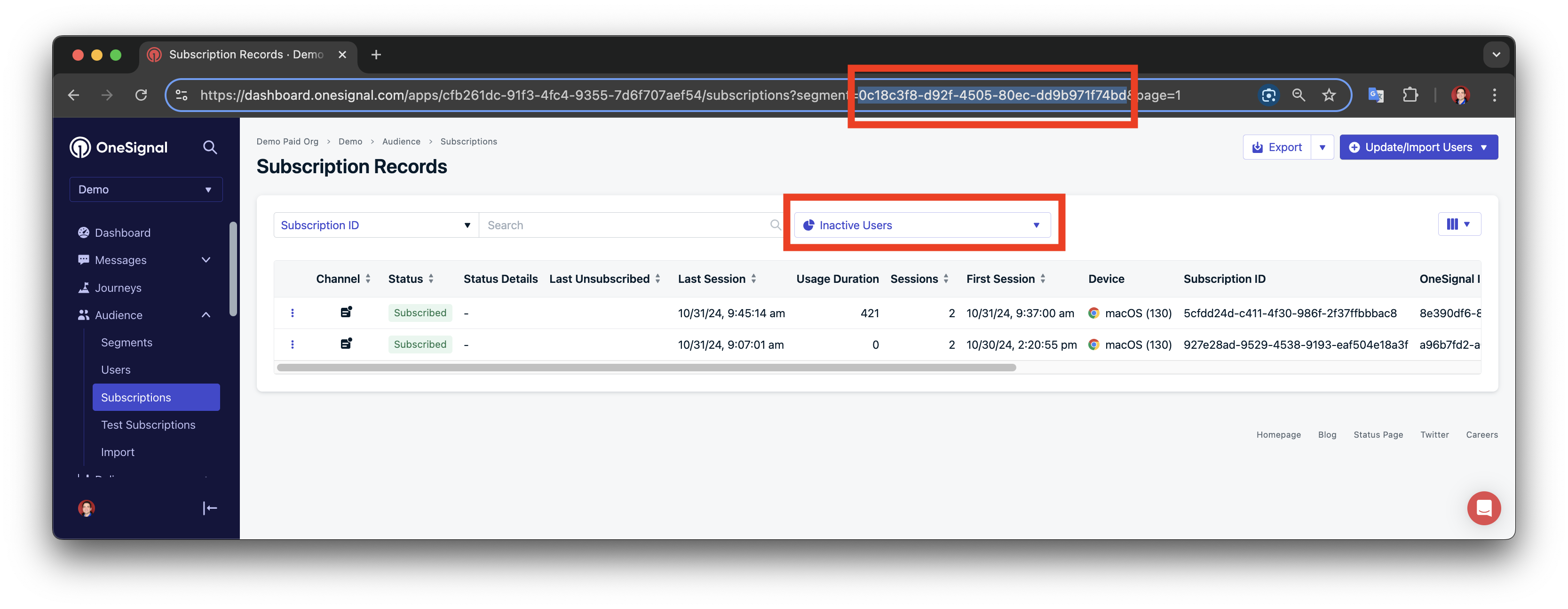
Example shows segment ID
Headers
Your App API key with prefix Key . See Keys & IDs.
Path Parameters
Your OneSignal App ID in UUID v4 format. See Keys & IDs.
The segment's unique identifier. In the dashboard, go to Audience > Segments, open the segment's options menu, and select Copy segment ID. You can also get it from the View segments API or the segment's URL in the dashboard.
Response
200
Example:
true
Was this page helpful?