

cURL
curl --request GET \
  --url 'https://api.onesignal.com/templates/{template_id}?app_id={app_id}' \
  --header 'Authorization: <authorization>' \
  --header 'Content-Type: <content-type>'
import Onesignal from '@onesignal/node-onesignal';
const configuration = Onesignal.createConfiguration({
restApiKey: 'YOUR_REST_API_KEY',
});
const apiInstance = new Onesignal.DefaultApi(configuration);
// string
const templateId: string = "e4d3c2b1-a09f-4f1e-8d7c-6b5a4f3e2d1c";
// string
const appId: string = "YOUR_APP_ID";
try {
const response = await apiInstance.viewTemplate(templateId, appId);
console.log(response);
} catch (e) {
if (e instanceof Onesignal.ApiException) {
// `e.errorMessages` flattens any error-envelope shape to a `string[]`;
// the raw parsed body remains on `e.body`.
console.error("viewTemplate failed: HTTP " + e.code, e.errorMessages);
} else {
throw e;
}
}import onesignal
from onesignal.api import default_api
from onesignal.models import *
from pprint import pprint
# See configuration.py for a list of all supported configuration parameters.
# Some of the OneSignal endpoints require ORGANIZATION_API_KEY token for authorization, while others require REST_API_KEY.
# We recommend adding both of them in the configuration page so that you will not need to figure it out yourself.
configuration = onesignal.Configuration(
rest_api_key = "YOUR_REST_API_KEY", # App REST API key required for most endpoints
organization_api_key = "YOUR_ORGANIZATION_API_KEY" # Organization key is only required for creating new apps and other top-level endpoints
)
# Enter a context with an instance of the API client
with onesignal.ApiClient(configuration) as api_client:
# Create an instance of the API class
api_instance = default_api.DefaultApi(api_client)
template_id = "e4d3c2b1-a09f-4f1e-8d7c-6b5a4f3e2d1c"
app_id = "YOUR_APP_ID"
try:
# View template
api_response = api_instance.view_template(template_id, app_id)
pprint(api_response)
except onesignal.ApiException as e:
print("Exception when calling DefaultApi->view_template: %s\n" % e)
print("Status Code: %s" % e.status)
print("Response Body: %s" % e.body)<?php
require_once(__DIR__ . '/vendor/autoload.php');
// Configure Bearer authorization: rest_api_key
$config = onesignal\client\Configuration::getDefaultConfiguration()
->setRestApiKeyToken('YOUR_REST_API_KEY')
->setOrganizationApiKeyToken('YOUR_ORGANIZATION_API_KEY');
$apiInstance = new onesignal\client\Api\DefaultApi(
// If you want use custom http client, pass your client which implements `GuzzleHttp\ClientInterface`.
// This is optional, `GuzzleHttp\Client` will be used as default.
new GuzzleHttp\Client(),
$config
);
$template_id = 'e4d3c2b1-a09f-4f1e-8d7c-6b5a4f3e2d1c'; // string
$app_id = 'YOUR_APP_ID'; // string
try {
$result = $apiInstance->viewTemplate($template_id, $app_id);
print_r($result);
} catch (\onesignal\client\ApiException $e) {
echo 'Exception when calling DefaultApi->viewTemplate: ', $e->getMessage(), PHP_EOL;
echo 'Status Code: ', $e->getCode(), PHP_EOL;
// getErrorMessages() flattens any error-envelope shape to a string[];
// the raw body remains on getResponseBody().
echo 'Error Messages: ', implode(', ', $e->getErrorMessages()), PHP_EOL;
echo 'Response Body: ', $e->getResponseBody(), PHP_EOL;
} catch (\Exception $e) {
echo 'Exception when calling DefaultApi->viewTemplate: ', $e->getMessage(), PHP_EOL;
}package main
import (
"context"
"fmt"
"os"
"github.com/OneSignal/onesignal-go-api/v5"
)
func main() {
templateId := "e4d3c2b1-a09f-4f1e-8d7c-6b5a4f3e2d1c" // string |
appId := "YOUR_APP_ID" // string |
configuration := onesignal.NewConfiguration()
apiClient := onesignal.NewAPIClient(configuration)
restAuth := context.WithValue(context.Background(), onesignal.RestApiKey, "YOUR_REST_API_KEY") // App REST API key required for most endpoints
resp, r, err := apiClient.DefaultApi.ViewTemplate(restAuth, templateId).AppId(appId).Execute()
if err != nil {
fmt.Fprintf(os.Stderr, "Error when calling `DefaultApi.ViewTemplate``: %v\n", err)
fmt.Fprintf(os.Stderr, "Full HTTP response: %v\n", r)
if apiErr, ok := err.(*onesignal.GenericOpenAPIError); ok {
// ErrorMessages() flattens any error-envelope shape to a []string;
// the raw body remains on Body().
fmt.Fprintf(os.Stderr, "Error Messages: %v\n", apiErr.ErrorMessages())
fmt.Fprintf(os.Stderr, "Response Body: %s\n", apiErr.Body())
}
}
// response from `ViewTemplate`: TemplateResource
fmt.Fprintf(os.Stdout, "Response from `DefaultApi.ViewTemplate`: %v\n", resp)
}require 'onesignal'
# setup authorization
OneSignal.configure do |config|
# Configure Bearer authorization: rest_api_key
config.rest_api_key = 'YOUR_REST_API_KEY'
end
api_instance = OneSignal::DefaultApi.new
template_id = 'e4d3c2b1-a09f-4f1e-8d7c-6b5a4f3e2d1c' # String |
app_id = 'YOUR_APP_ID' # String |
begin
# View template
result = api_instance.view_template(template_id, app_id)
p result
rescue OneSignal::ApiError => e
puts "Error when calling DefaultApi->view_template: #{e}"
puts "Status Code: #{e.code}"
# `e.error_messages` flattens any error-envelope shape to an Array<String>;
# the raw body remains on `e.response_body`.
puts "Error Messages: #{e.error_messages}"
puts "Response Body: #{e.response_body}"
end// Import classes:
import java.util.Arrays;
import java.util.List;
import com.onesignal.client.ApiClient;
import com.onesignal.client.ApiException;
import com.onesignal.client.Configuration;
import com.onesignal.client.auth.*;
import com.onesignal.client.model.*;
import com.onesignal.client.api.DefaultApi;
public class Example {
public static void main(String[] args) {
ApiClient defaultClient = Configuration.getDefaultApiClient();
defaultClient.setBasePath("https://api.onesignal.com");
// Configure HTTP bearer authorization: rest_api_key
HttpBearerAuth rest_api_key = (HttpBearerAuth) defaultClient.getAuthentication("rest_api_key");
rest_api_key.setBearerToken("YOUR_REST_API_KEY");
DefaultApi apiInstance = new DefaultApi(defaultClient);
String templateId = "e4d3c2b1-a09f-4f1e-8d7c-6b5a4f3e2d1c"; // String |
String appId = "YOUR_APP_ID"; // String |
try {
TemplateResource result = apiInstance.viewTemplate(templateId, appId);
System.out.println(result);
} catch (ApiException e) {
System.err.println("Exception when calling DefaultApi#viewTemplate");
System.err.println("Status code: " + e.getCode());
// getErrorMessages() flattens any error-envelope shape to a List<String>;
// the raw body remains on getResponseBody().
System.err.println("Error messages: " + e.getErrorMessages());
System.err.println("Reason: " + e.getResponseBody());
System.err.println("Response headers: " + e.getResponseHeaders());
e.printStackTrace();
}
}
}using System;
using System.Collections.Generic;
using System.Diagnostics;
using OneSignalApi.Api;
using OneSignalApi.Client;
using OneSignalApi.Model;
namespace Example
{
public class ViewTemplateExample
{
public static void Main()
{
Configuration config = new Configuration();
config.BasePath = "https://api.onesignal.com";
// Configure Bearer token for authorization: rest_api_key
config.AccessToken = "YOUR_REST_API_KEY";
var apiInstance = new DefaultApi(config);
var templateId = "e4d3c2b1-a09f-4f1e-8d7c-6b5a4f3e2d1c"; // string |
var appId = "YOUR_APP_ID"; // string |
try
{
// View template
TemplateResource result = apiInstance.ViewTemplate(templateId, appId);
Debug.WriteLine(result);
}
catch (ApiException e)
{
Debug.Print("Exception when calling DefaultApi.ViewTemplate: " + e.Message );
Debug.Print("Status Code: "+ e.ErrorCode);
// e.ErrorMessages flattens any error-envelope shape to an IReadOnlyList<string>;
// the raw body remains on e.ErrorContent.
Debug.Print("Error Messages: " + string.Join(", ", e.ErrorMessages));
Debug.Print("Response Body: " + e.ErrorContent);
Debug.Print(e.StackTrace);
}
}
}
}use onesignal_rust_api::apis::configuration::Configuration;
use onesignal_rust_api::apis::default_api;
#[tokio::main]
async fn main() {
let mut configuration = Configuration::new();
configuration.rest_api_key_token = Some("YOUR_REST_API_KEY".to_string());
// Realistic values are pulled from the spec's `example:` fields where present.
let template_id: &str = "e4d3c2b1-a09f-4f1e-8d7c-6b5a4f3e2d1c";
let app_id: &str = "YOUR_APP_ID";
match default_api::view_template(&configuration, template_id, app_id).await {
Ok(resp) => println!("{:?}", resp),
Err(e @ onesignal_rust_api::apis::Error::ResponseError(_)) => {
// `e.error_messages()` flattens any error-envelope shape to a Vec<String>;
// the raw response remains on the ResponseError variant.
eprintln!("view_template failed: {:?}", e.error_messages());
}
Err(e) => eprintln!("view_template failed: {:?}", e),
}
}{
"id": "Template-ID-in-UUID-v4-format",
"name": "<string>",
"channel": "push",
"created_at": "2023-07-20T19:16:55Z",
"updated_at": "2023-07-20T19:16:55Z",
"content": {
"isAndroid": true,
"isIos": true,
"isMacOSX": true,
"isAdm": true,
"isWP_WNS": true,
"isChromeWeb": true,
"isSafari": true,
"isFirefox": true,
"isEdge": true,
"headings": {
"en": "<string>"
},
"contents": {
"en": "<string>"
},
"global_image": "<unknown>",
"url": "https://example.com",
"isEmail": true,
"email_body": "<string>",
"email_subject": "This is your email subject.",
"email_preheader": "<unknown>",
"email_from_address": "<string>",
"email_from_name": "<unknown>",
"isSMS": true,
"sms_from": "<unknown>",
"sms_media_urls": "<unknown>",
"email_reply_to_address": "<unknown>",
"disable_email_click_tracking": "<unknown>"
}
}{
"errors": [
"Request is malformed: Failed to parse app_id from request"
]
}{
"errors": [
"template not found"
]
}{
"errors": [
{
"code": "Rate Limit Exceeded",
"title": "Example error title"
}
]
}{
"errors": [
"Service temporarily unavailable"
]
}View template
Retrieve the details of a specific message template in your OneSignal app using its template ID. This API returns the template content, target channel, and timestamps for creation and last update.
GET
/
templates
/
{template_id}
?app_id=
{app_id}
cURL
curl --request GET \
  --url 'https://api.onesignal.com/templates/{template_id}?app_id={app_id}' \
  --header 'Authorization: <authorization>' \
  --header 'Content-Type: <content-type>'
import Onesignal from '@onesignal/node-onesignal';
const configuration = Onesignal.createConfiguration({
restApiKey: 'YOUR_REST_API_KEY',
});
const apiInstance = new Onesignal.DefaultApi(configuration);
// string
const templateId: string = "e4d3c2b1-a09f-4f1e-8d7c-6b5a4f3e2d1c";
// string
const appId: string = "YOUR_APP_ID";
try {
const response = await apiInstance.viewTemplate(templateId, appId);
console.log(response);
} catch (e) {
if (e instanceof Onesignal.ApiException) {
// `e.errorMessages` flattens any error-envelope shape to a `string[]`;
// the raw parsed body remains on `e.body`.
console.error("viewTemplate failed: HTTP " + e.code, e.errorMessages);
} else {
throw e;
}
}import onesignal
from onesignal.api import default_api
from onesignal.models import *
from pprint import pprint
# See configuration.py for a list of all supported configuration parameters.
# Some of the OneSignal endpoints require ORGANIZATION_API_KEY token for authorization, while others require REST_API_KEY.
# We recommend adding both of them in the configuration page so that you will not need to figure it out yourself.
configuration = onesignal.Configuration(
rest_api_key = "YOUR_REST_API_KEY", # App REST API key required for most endpoints
organization_api_key = "YOUR_ORGANIZATION_API_KEY" # Organization key is only required for creating new apps and other top-level endpoints
)
# Enter a context with an instance of the API client
with onesignal.ApiClient(configuration) as api_client:
# Create an instance of the API class
api_instance = default_api.DefaultApi(api_client)
template_id = "e4d3c2b1-a09f-4f1e-8d7c-6b5a4f3e2d1c"
app_id = "YOUR_APP_ID"
try:
# View template
api_response = api_instance.view_template(template_id, app_id)
pprint(api_response)
except onesignal.ApiException as e:
print("Exception when calling DefaultApi->view_template: %s\n" % e)
print("Status Code: %s" % e.status)
print("Response Body: %s" % e.body)<?php
require_once(__DIR__ . '/vendor/autoload.php');
// Configure Bearer authorization: rest_api_key
$config = onesignal\client\Configuration::getDefaultConfiguration()
->setRestApiKeyToken('YOUR_REST_API_KEY')
->setOrganizationApiKeyToken('YOUR_ORGANIZATION_API_KEY');
$apiInstance = new onesignal\client\Api\DefaultApi(
// If you want use custom http client, pass your client which implements `GuzzleHttp\ClientInterface`.
// This is optional, `GuzzleHttp\Client` will be used as default.
new GuzzleHttp\Client(),
$config
);
$template_id = 'e4d3c2b1-a09f-4f1e-8d7c-6b5a4f3e2d1c'; // string
$app_id = 'YOUR_APP_ID'; // string
try {
$result = $apiInstance->viewTemplate($template_id, $app_id);
print_r($result);
} catch (\onesignal\client\ApiException $e) {
echo 'Exception when calling DefaultApi->viewTemplate: ', $e->getMessage(), PHP_EOL;
echo 'Status Code: ', $e->getCode(), PHP_EOL;
// getErrorMessages() flattens any error-envelope shape to a string[];
// the raw body remains on getResponseBody().
echo 'Error Messages: ', implode(', ', $e->getErrorMessages()), PHP_EOL;
echo 'Response Body: ', $e->getResponseBody(), PHP_EOL;
} catch (\Exception $e) {
echo 'Exception when calling DefaultApi->viewTemplate: ', $e->getMessage(), PHP_EOL;
}package main
import (
"context"
"fmt"
"os"
"github.com/OneSignal/onesignal-go-api/v5"
)
func main() {
templateId := "e4d3c2b1-a09f-4f1e-8d7c-6b5a4f3e2d1c" // string |
appId := "YOUR_APP_ID" // string |
configuration := onesignal.NewConfiguration()
apiClient := onesignal.NewAPIClient(configuration)
restAuth := context.WithValue(context.Background(), onesignal.RestApiKey, "YOUR_REST_API_KEY") // App REST API key required for most endpoints
resp, r, err := apiClient.DefaultApi.ViewTemplate(restAuth, templateId).AppId(appId).Execute()
if err != nil {
fmt.Fprintf(os.Stderr, "Error when calling `DefaultApi.ViewTemplate``: %v\n", err)
fmt.Fprintf(os.Stderr, "Full HTTP response: %v\n", r)
if apiErr, ok := err.(*onesignal.GenericOpenAPIError); ok {
// ErrorMessages() flattens any error-envelope shape to a []string;
// the raw body remains on Body().
fmt.Fprintf(os.Stderr, "Error Messages: %v\n", apiErr.ErrorMessages())
fmt.Fprintf(os.Stderr, "Response Body: %s\n", apiErr.Body())
}
}
// response from `ViewTemplate`: TemplateResource
fmt.Fprintf(os.Stdout, "Response from `DefaultApi.ViewTemplate`: %v\n", resp)
}require 'onesignal'
# setup authorization
OneSignal.configure do |config|
# Configure Bearer authorization: rest_api_key
config.rest_api_key = 'YOUR_REST_API_KEY'
end
api_instance = OneSignal::DefaultApi.new
template_id = 'e4d3c2b1-a09f-4f1e-8d7c-6b5a4f3e2d1c' # String |
app_id = 'YOUR_APP_ID' # String |
begin
# View template
result = api_instance.view_template(template_id, app_id)
p result
rescue OneSignal::ApiError => e
puts "Error when calling DefaultApi->view_template: #{e}"
puts "Status Code: #{e.code}"
# `e.error_messages` flattens any error-envelope shape to an Array<String>;
# the raw body remains on `e.response_body`.
puts "Error Messages: #{e.error_messages}"
puts "Response Body: #{e.response_body}"
end// Import classes:
import java.util.Arrays;
import java.util.List;
import com.onesignal.client.ApiClient;
import com.onesignal.client.ApiException;
import com.onesignal.client.Configuration;
import com.onesignal.client.auth.*;
import com.onesignal.client.model.*;
import com.onesignal.client.api.DefaultApi;
public class Example {
public static void main(String[] args) {
ApiClient defaultClient = Configuration.getDefaultApiClient();
defaultClient.setBasePath("https://api.onesignal.com");
// Configure HTTP bearer authorization: rest_api_key
HttpBearerAuth rest_api_key = (HttpBearerAuth) defaultClient.getAuthentication("rest_api_key");
rest_api_key.setBearerToken("YOUR_REST_API_KEY");
DefaultApi apiInstance = new DefaultApi(defaultClient);
String templateId = "e4d3c2b1-a09f-4f1e-8d7c-6b5a4f3e2d1c"; // String |
String appId = "YOUR_APP_ID"; // String |
try {
TemplateResource result = apiInstance.viewTemplate(templateId, appId);
System.out.println(result);
} catch (ApiException e) {
System.err.println("Exception when calling DefaultApi#viewTemplate");
System.err.println("Status code: " + e.getCode());
// getErrorMessages() flattens any error-envelope shape to a List<String>;
// the raw body remains on getResponseBody().
System.err.println("Error messages: " + e.getErrorMessages());
System.err.println("Reason: " + e.getResponseBody());
System.err.println("Response headers: " + e.getResponseHeaders());
e.printStackTrace();
}
}
}using System;
using System.Collections.Generic;
using System.Diagnostics;
using OneSignalApi.Api;
using OneSignalApi.Client;
using OneSignalApi.Model;
namespace Example
{
public class ViewTemplateExample
{
public static void Main()
{
Configuration config = new Configuration();
config.BasePath = "https://api.onesignal.com";
// Configure Bearer token for authorization: rest_api_key
config.AccessToken = "YOUR_REST_API_KEY";
var apiInstance = new DefaultApi(config);
var templateId = "e4d3c2b1-a09f-4f1e-8d7c-6b5a4f3e2d1c"; // string |
var appId = "YOUR_APP_ID"; // string |
try
{
// View template
TemplateResource result = apiInstance.ViewTemplate(templateId, appId);
Debug.WriteLine(result);
}
catch (ApiException e)
{
Debug.Print("Exception when calling DefaultApi.ViewTemplate: " + e.Message );
Debug.Print("Status Code: "+ e.ErrorCode);
// e.ErrorMessages flattens any error-envelope shape to an IReadOnlyList<string>;
// the raw body remains on e.ErrorContent.
Debug.Print("Error Messages: " + string.Join(", ", e.ErrorMessages));
Debug.Print("Response Body: " + e.ErrorContent);
Debug.Print(e.StackTrace);
}
}
}
}use onesignal_rust_api::apis::configuration::Configuration;
use onesignal_rust_api::apis::default_api;
#[tokio::main]
async fn main() {
let mut configuration = Configuration::new();
configuration.rest_api_key_token = Some("YOUR_REST_API_KEY".to_string());
// Realistic values are pulled from the spec's `example:` fields where present.
let template_id: &str = "e4d3c2b1-a09f-4f1e-8d7c-6b5a4f3e2d1c";
let app_id: &str = "YOUR_APP_ID";
match default_api::view_template(&configuration, template_id, app_id).await {
Ok(resp) => println!("{:?}", resp),
Err(e @ onesignal_rust_api::apis::Error::ResponseError(_)) => {
// `e.error_messages()` flattens any error-envelope shape to a Vec<String>;
// the raw response remains on the ResponseError variant.
eprintln!("view_template failed: {:?}", e.error_messages());
}
Err(e) => eprintln!("view_template failed: {:?}", e),
}
}{
"id": "Template-ID-in-UUID-v4-format",
"name": "<string>",
"channel": "push",
"created_at": "2023-07-20T19:16:55Z",
"updated_at": "2023-07-20T19:16:55Z",
"content": {
"isAndroid": true,
"isIos": true,
"isMacOSX": true,
"isAdm": true,
"isWP_WNS": true,
"isChromeWeb": true,
"isSafari": true,
"isFirefox": true,
"isEdge": true,
"headings": {
"en": "<string>"
},
"contents": {
"en": "<string>"
},
"global_image": "<unknown>",
"url": "https://example.com",
"isEmail": true,
"email_body": "<string>",
"email_subject": "This is your email subject.",
"email_preheader": "<unknown>",
"email_from_address": "<string>",
"email_from_name": "<unknown>",
"isSMS": true,
"sms_from": "<unknown>",
"sms_media_urls": "<unknown>",
"email_reply_to_address": "<unknown>",
"disable_email_click_tracking": "<unknown>"
}
}{
"errors": [
"Request is malformed: Failed to parse app_id from request"
]
}{
"errors": [
"template not found"
]
}{
"errors": [
{
"code": "Rate Limit Exceeded",
"title": "Example error title"
}
]
}{
"errors": [
"Service temporarily unavailable"
]
}Overview
This endpoint returns metadata and content for a single template, including:- Template body/content
- Target delivery channel (e.g., push, email, SMS)
- Creation and last updated timestamps
See Templates for more information.
How to use this API
Required parameters:app_id(query param): Your OneSignal App ID.template_id(path param): The unique ID of the template.
Template ID
Each template has a unique OneSignal-generatedtemplate_id (UUID v4). You can find it:
- Using the View Templates API
- In the OneSignal Dashboard under Messages > Templates > Options > Copy Template ID
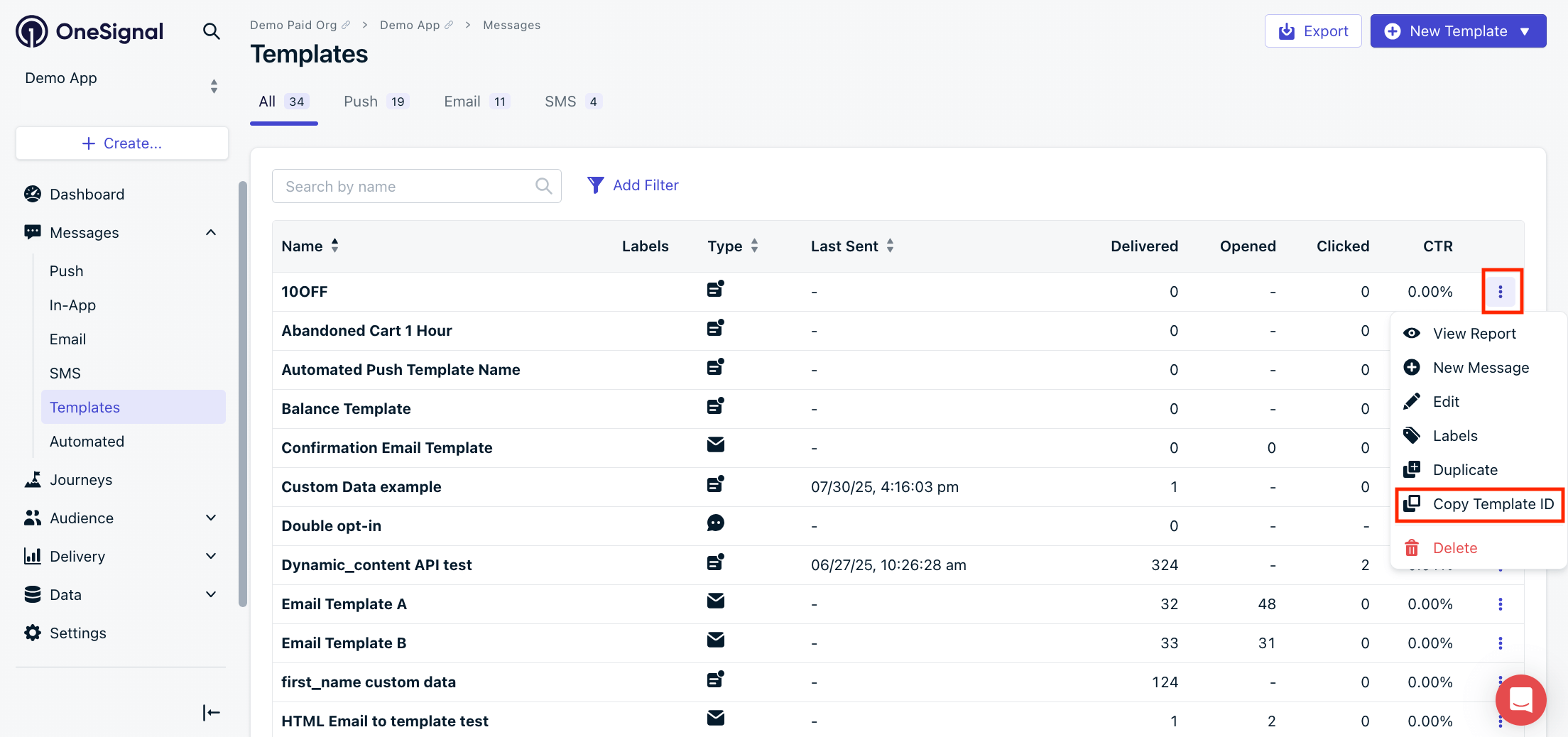
Copy Template ID
Path Parameters
Query Parameters
Your OneSignal App ID in UUID v4 format. See Keys & IDs.
Response
200
- 200 OK - Push
- 200 OK - Email
The template ID in UUID v4 format.
Example:
"Template-ID-in-UUID-v4-format"
An internal name you set to help organize and track Templates. Maximum 128 characters.
Options are: push, email, and SMS.
Example:
"push"
The date and time the template was created in ISO 8601 format.
Example:
"2023-07-20T19:16:55Z"
The date and time the template was last updated in ISO 8601 format.
Example:
"2023-07-20T19:16:55Z"
The template content.
Show child attributes
Show child attributes
Was this page helpful?