

Overview
A deep link routes the recipient of a OneSignal message to a specific screen in your app instead of a web page. OneSignal delivers the link to the device; the operating system and your app are responsible for resolving it. This guide covers how to use deep links inside OneSignal messages — it does not cover how to configure your app to receive them. For platform setup, see Apple’s Supporting universal links in your app and Google’s About deep links.Prerequisites
Before you can deep-link from a OneSignal message, your app must already be set up to receive the link type you plan to use:- The OneSignal Mobile SDK is installed and initialized.
- Your app developers have configured a deep link handler for each platform you target:
- iOS — Universal Links (Associated Domains entitlement + apple-app-site-association (AASA) file hosted on your domain) and/or a custom URL scheme registered in
CFBundleURLTypes. - Android — App Links (intent filters with
autoVerify="true"+ Digital Asset Links file (assetlinks.json) hosted on your domain) and/or a custom URI scheme registered in yourAndroidManifest.xml.
- iOS — Universal Links (Associated Domains entitlement + apple-app-site-association (AASA) file hosted on your domain) and/or a custom URL scheme registered in
- For email and SMS/RCS, only Universal Links / App Links work — custom URI schemes are not clickable from those clients.
adb shell am start -a android.intent.action.VIEW -d "<url>" on Android), OneSignal can deliver it through any supported channel.
Choose a link type
Recommendation: Use Universal Links / App Links (
https://) for anything sent via email or SMS — custom schemes do not work in those clients. For push and in-app messages, either works.
On Android 12+, an
https:// link that is not a verified App Link opens in the user’s default browser, not your app. If deep links from push or email are opening the browser on Android, the App Link verification is the first thing to check.Send a deep link in a push notification
OneSignal supports two ways to attach a deep link to a push notification. Pick one based on how much control you want over navigation.Launch URL (url / app_url)
Set the Launch URL in the dashboard, or pass url (all platforms) or app_url (mobile only) in the API.
Additional Data (data) — recommended for mobile
Put the destination in Additional Data instead and do the navigation yourself in the push click listener. This avoids the iOS browser bounce entirely and lets you pass structured context.
iOS Launch URL behavior
OneSignal’s iOS SDK usesopenURL to handle the url / app_url property. Even with Universal Links correctly configured, this causes the link to open in the browser first and then redirect back into the app — a noticeable “flash” for users.
You have two ways to avoid it:
- Use
datainstead ofurland route from your push click listener. Recommended. - Suppress Launch URLs globally. Add a Boolean
OneSignal_suppress_launch_urlswith valueYESto your app’sInfo.plist. OneSignal will stop callingopenURL, and you must handle every deep link in the click listener.
Send a deep link in an in-app message
In-app messages use click actions instead of a URL property. For the full list of click action types, see In-app click actions.Drag-and-drop editor
- Add a button, image, or background click target.
- Open Add click action.
- Choose one of:
- URL — opens the link in the device’s browser (or, if Universal Links / App Links are configured for that domain, opens your app).
- Custom action ID — passes the value to your in-app click listener without opening anything. Use this when you want to navigate inside the app you control.
- Enter your deep link (e.g.
https://yourdomain.com/promo) or action identifier (e.g.open_promo).
HTML editor
In sandboxed HTML in-app messages, use the In-App Message JS API:OneSignalIamApi.openUrl(e)— opens the URL in the device browser using default URL handling.OneSignalIamApi.addClickName(e)— sends a custom click name to your in-app click listener without opening a browser.
Send a deep link in an email
By default, OneSignal rewrites every link in an email for click tracking. The rewritten URL uses OneSignal’s tracking domain, which does not match your app’s Associated Domain or Digital Asset Links host — so iOS and Android treat the link as a regular web URL and open the browser instead of your app. To preserve deep linking in email, disable click tracking for the deep link using one of these options: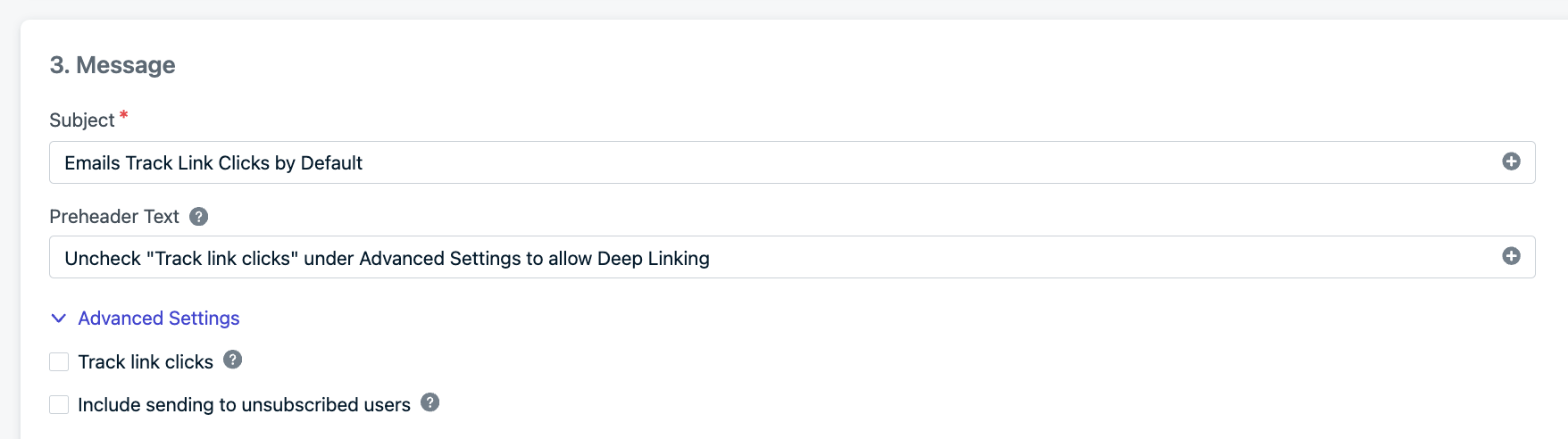
Track link clicks disabled in the email editor.
Expected behavior
Send a deep link in SMS or RCS
SMS and RCS messages support onlyhttps:// links — custom schemes like myapp:// won’t open from the Messages app. Insert the link inline in the message body.
If you use OneSignal’s trackable link feature ({{ "https://..." | track_link }} or the Insert Trackable Link button), the URL is replaced with a 1sgnl.co short link, which breaks Universal Link / App Link domain matching. Do not wrap deep-link URLs in track_link — send them raw so the OS can match them to your app.
See URLs, links, & deep links → SMS/RCS trackable links for the tracking-link format.
Handle deep links in your app
The most reliable way to route a OneSignal deep link is to intercept it with a click listener and do the navigation yourself. This works regardless of platform quirks (iOSopenURL, Android 12+ verification, email tracking rewrites) as long as your listener receives the event.
Push notification click listener
Register the listener as early as possible — inApplication.onCreate() on Android or application(_:didFinishLaunchingWithOptions:) on iOS — so it is active before the user taps a cold-start notification.
addClickListener() Push.
In-app message click listener
Fires when a user taps a button configured with a Custom action ID (or whenOneSignalIamApi.addClickName is called in HTML).
addClickListener() In-App.
Personalize deep links per user
Every URL field in OneSignal — Launch URL, Additional Data values, in-app URL actions, email body links — accepts Liquid syntax. Use it to inject the user’sexternal_id, tags, or custom_data into the path or query string.
Test deep links from OneSignal
- Send a test message from the OneSignal dashboard with your deep link as the Launch URL, Additional Data value, or in-app click action.
- Tap the notification or in-app button on a real device (Universal Links do not activate in the iOS Simulator from all sources).
- Confirm the app opens directly to the right screen and your click listener logs the expected URL or action ID.
adb shell pm verify-app-links --re-verify <package>.
On iOS, Universal Links do not activate from the Safari address bar. Test from Notes, Mail, Messages, or a OneSignal push/in-app message.
Troubleshooting
iOS push opens Safari for a second before my app
OneSignal’s SDK usesopenURL for the Launch URL. Fix with one of the two approaches above: send the link in Additional Data and route from the click listener, or set OneSignal_suppress_launch_urls=YES in Info.plist.
Android push opens the browser instead of the app
Thehttps:// link is not being recognized as a verified App Link. Check that your intent filter uses android:autoVerify="true", that assetlinks.json is reachable at https://yourdomain.com/.well-known/assetlinks.json (HTTP 200, application/json, no redirects), and that its SHA-256 fingerprint matches the certificate you actually shipped (Play App Signing uses a different fingerprint than your local keystore). See Google’s Troubleshoot App Links.
Deep link works in push but not in email
Email click tracking rewrites the URL and breaks domain matching. Disable tracking for that link or that email.Deep link is received but the app doesn’t navigate
- The click listener was registered after the click event fired. Register in
Application.onCreate()(Android) orapplication(_:didFinishLaunchingWithOptions:)(iOS), before any other async work. - The
launchURLoractionIddoesn’t match what your router expects. Log the raw value. - On iOS, the Launch URL (
url) is being used without suppressing it — the browser may consume the link before your listener fires. Switch to Additional Data.
I updated my AASA file and iOS still doesn’t open the app
Starting in iOS 14 / macOS 11, Apple’s CDN fetches AASA files, not the device. The CDN requests a refresh within 24 hours, and installed devices re-check roughly once per week. Reinstall the app to force an immediate fetch during testing.FAQ
Should I use Launch URL or Additional Data?
Additional Data is recommended for mobile deep links. It bypasses iOS’sopenURL browser flash and gives your click listener structured data instead of a string to parse. Launch URL is simpler and fine for web push or when you accept the iOS behavior.
Do deep links work with OneSignal Journeys?
Yes. Set the Launch URL or Additional Data on any push or in-app step the same way you would for a one-off message. Email steps follow the same click-tracking rules — disable tracking on the deep link.Can I deep link into another app (not mine)?
Yes, for push and in-app only. Set a custom URL scheme that the other app registers (e.g.whatsapp://send?phone=15551234567). Custom schemes do not work in email or SMS clients.
What happens if the user doesn’t have the app installed?
With Universal Links (iOS) or App Links (Android), thehttps:// URL loads as a normal web page — you can host a landing page that redirects to the App Store / Play Store. With a custom URI scheme (myapp://), the tap fails silently or shows an error; there is no fallback.
Can I use a trackable SMS link as a deep link?
No. OneSignal’s SMS trackable links rewrite the URL to1sgnl.co, which isn’t associated with your app. Send the original https:// URL so the OS can match it to your Associated Domain or Digital Asset Links entry.
Do I need the OneSignal SDK to handle a deep link?
No, but it’s recommended. Universal Links / App Links are handled by the OS regardless of which SDK sent the message. Using OneSignal’s click listener gives you a consistent entry point across channels and avoids platform-specific quirks like the iOSopenURL flash.
URLs, links, & deep links
Launch URLs, UTM parameters, dynamic URLs, and click tracking across every channel.
Mobile SDK reference
Full API reference for push and in-app click listeners and notification events.
In-app click actions
Configure URL, custom action ID, and other click actions for in-app buttons.
Mobile push setup
Platform-specific push notification setup for Android and iOS.