

For current plan prices and features, visit the Pricing page. This page covers invoices, usage, and how billing works.
- How to complete common billing tasks
- What affects your invoice amount
- How usage is calculated
- How to manage or reduce costs
- How billing relates to Apps and Organizations
Free plan MAU limit
The OneSignal Free plan is changing. We’re bringing deeper lifecycle messaging to our entry plan, with new AI and personalization features, and removal of paid-plan gates for many existing capabilities. Customers on the Growth plan also get access to use more Journeys and Data Tags at no additional charge. As part of this change, we’re introducing a limit to the Free plan’s allowed MAU that affects mobile push and in-app messaging. On the Free plan, you must have fewer than 1,000 monthly active users (MAU) to send mobile push and in-app messages. These changes take effect for new customers on September 1, 2026 and existing customers on October 1, 2026.What happens if you exceed 1,000 MAU
If you have not upgraded and have more than 1,000 MAU when the limit takes effect (October 1, 2026 for existing customers, September 1, 2026 for new customers):- Mobile push and in-app messages stop sending until you upgrade.
- Other channels continue to work, including web push notifications, email, and SMS, within the same plan limits as before. See the Pricing page for details.
- Any Journeys that use push notification or in-app message steps skip sending to mobile Subscriptions.
Common billing tasks
View your Organization’s Billing and Usage within Organization settings > Billing.You must be an Organization Admin to view the billing page. See Manage Team Members and ask an Org Admin to add you as a Billing Contact. You can also view App-level usage in Settings > Usage.
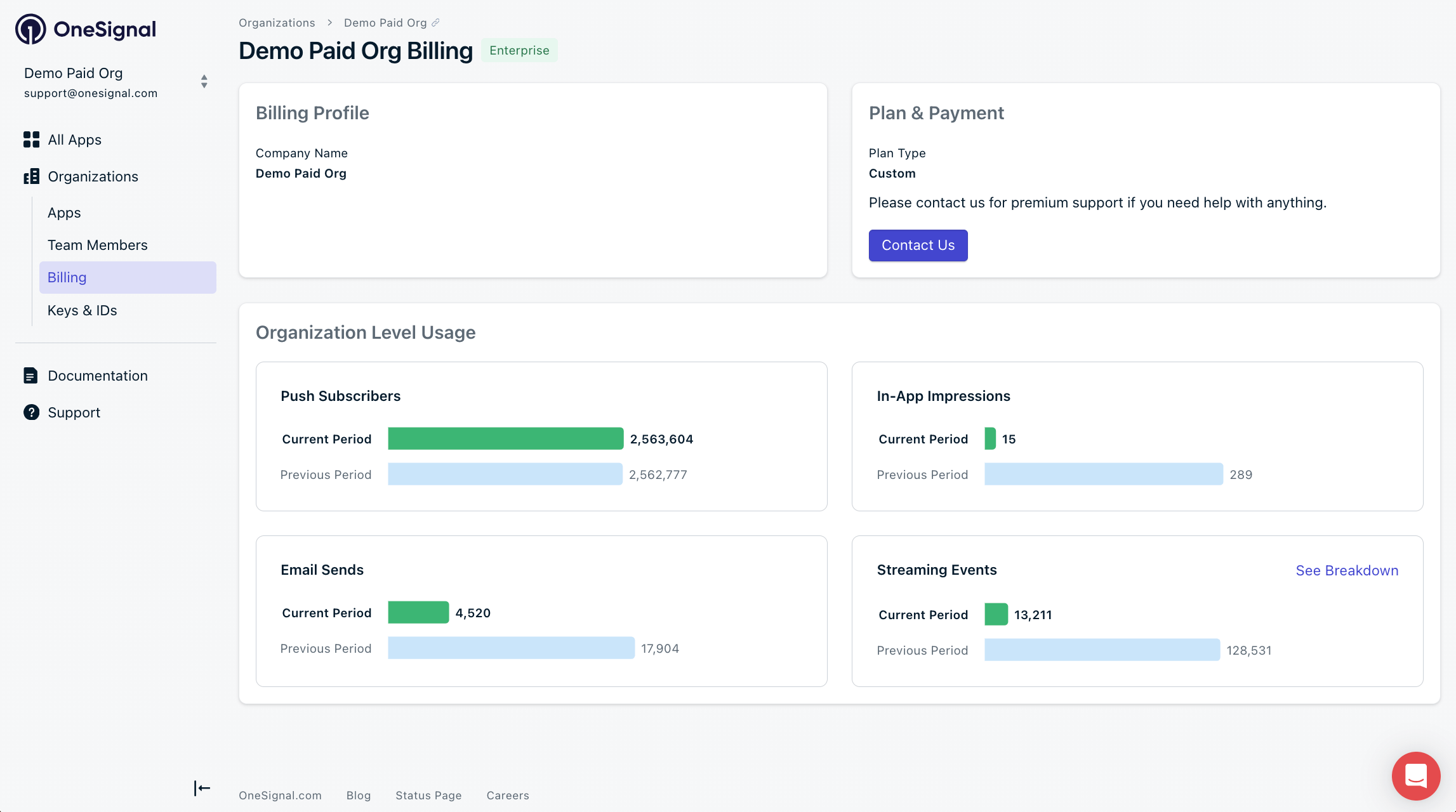
The OneSignal Organization Billing page
Download an invoice
Self-serve (Growth & legacy plans)- Go to Organization settings > Billing.
- Under Invoices, select the invoice.
- Click Download.
The invoice downloads immediately as a PDF.
ar@onesignal.com with:
- Full company name
- Billing email (if available)
- Organization ID (found in Organization settings > Security)
Update your payment method
Self-serve (Growth & legacy plans)- Go to Organization settings > Billing.
- Next to Payment Method, click Update.
- Enter your updated payment details and Save.
Your updated payment method appears immediately in the billing page.
- Open the secure billing portal from your Billing Welcome Email.
- Enter your updated payment details.
- Save changes.
ar@onesignal.com with:
- Full company name
- Billing email (if available)
- Organization ID (found in Organization settings > Security)
Change billing information
Self-serve (Growth & legacy plans)- Go to Organization settings > Billing.
- Next to Billing Profile, click Edit.
- Enter your updated billing information and Save.
Your updated billing information appears immediately in the billing page.
- Open the secure billing portal from your Billing Welcome Email.
- Enter your updated billing information.
- Save changes.
ar@onesignal.com with:
- Full company name
- Billing email (if available)
- Organization ID (found in Organization settings > Security)
Upgrade your plan
Self-serve (Growth): Log in to your OneSignal dashboard and go to Organization settings > Billing to upgrade to the Growth plan. If you have over 50,000 MAU, or if you’d like to explore the benefits of our annual plans, contact our Sales team and someone from the OneSignal team will reach out to you shortly.Downgrade to Free
Self-serve (Growth & legacy plans)- Go to Organization settings > Billing.
- Select Change Plan.
- Click the Free plan.
- Confirm the downgrade.
ar@onesignal.com to discuss changes.
Reactivate a suspended account
Self-serve accounts are disabled after three failed payment attempts. To reactivate:- Pay any outstanding invoices.
- Allow up to one business day for reactivation.
support@onesignal.com with:
- Full company name
- Billing email (if available)
- Organization ID (found in Organization settings > Security)
What affects your invoice amount?
Your invoice is based on one or more of the following:- Active Mobile Monthly Active Users (MAU)
- Active Web Push Subscribers
- Email sends
- Event Streams volume
- Custom Event storage
- Mobile MAU + Web Push Subscribers (current pricing model)
- Push Subscribers (legacy plans only)
How billing is calculated
Monthly Active Users (MAU)
A billing metric. MAU is the count of Mobile Subscriptions with at least one session during your billing cycle. It does not depend on subscription status. Only Mobile Subscriptions count toward MAU: iOS, Android, Huawei, Amazon, macOS, Windows, and Chrome Extensions. Web Push, Email, and SMS Subscriptions do not count toward MAU. A session is recorded when:- Your app is opened with the OneSignal SDK active, or
- You update the
last_activeproperty via the API. Note that API updates count even if the person never opened the app, including during data imports.
This billing metric is measured within your billing cycle. It is separate from the Free plan MAU limit, which is measured over a trailing 30-day period.
Web Push Subscribers
Users who subscribed to receive web push notifications from a supported web browser.- Each subscribed browser is a separate Subscription.
- One user subscribed on two browsers counts as 2 Subscriptions.
Push Subscribers (legacy plans only)
On some older plans, OneSignal bills by total subscribed mobile and web push Subscriptions instead of MAU. To reduce subscriber count, remove users via the dashboard or API. See Delete Users. To switch from this legacy model to MAU billing, contact our Sales team.Messaging usage
Email sends
You are billed for emails that leave OneSignal, including:- Delivered
- Bounced
- Most Failures
- Invalid ESP credentials
- Delivery Error
Self-serve (Growth & legacy plans) are capped at 500,000 emails per month. Contact
support@onesignal.com to lift this limit or contact our Sales team to discuss volume-based discounted pricing.RCS
RCS messages are billed per message segment based on the message type:
For more on RCS message types, see Rich Communication Services (RCS).
In-App impressions (legacy plans only)
In-App impressions are billed only on legacy plans that charge separately for in-app messages. On current plans, in-app messaging is included with mobile push at no extra cost. When billed, an impression counts each display of an in-app message in mobile apps. This metric does not include push notifications or email.Event-related billing
Event billing relates to both: data being sent out of OneSignal (Event Streams) and data being stored in OneSignal (Custom Events).Outbound data (Event Streams, webhooks)
OneSignal can send message event data (Event Streams, Integrations) and Webhooks out to your external destinations. This is billed based on the number of events delivered per month. Your plan sets how many active Event Streams you can have and how many events you can deliver per month:
Events delivered through webhooks and integration destinations count toward the monthly event limit. Inbound Custom Events that you send into OneSignal do not count toward Event Streams limits. Custom Events are billed separately based on stored event volume. See Event-related billing for both sets of limits.
Inbound data (Custom Events)
You send Custom Events in to OneSignal from your app or backend systems to power Segments, Journeys, and Custom Conversions. Sending Custom Events to OneSignal is free on all paid plans. OneSignal only bills for events that are stored for segmentation. Events power Journeys, Conversion Metrics, and Liquid personalization whether or not you store them. Storing events adds two capabilities: building Segments from them, and viewing them on the user profile. Storage stays off until someone on your account with permission to edit retention settings accepts the billing terms. Until then, OneSignal receives your events and makes them available to Journeys, Conversion Metrics, and Liquid personalization without storing them. Each plan includes a monthly allotment of stored events. OneSignal charges events above that allotment at your plan’s overage rate, which the dashboard shows you when you turn on storage.
Your allotment is applied at the organization level, so events stored in one app count toward the same total as events stored in any other app in your organization.
Retention is how long OneSignal keeps each stored event, and it’s the setting that controls your storage cost. You set a default retention for each app, then override it on individual events when you want more control. Setting an event to Not stored (0 days) costs nothing, because OneSignal doesn’t keep that event.
Billing reads your stored count when the cycle closes, so lowering retention before then lowers what you owe for that cycle. Deletion runs overnight rather than immediately, so leave a day for your stored count to catch up.
Custom event storage and retention
Turn on storage, set retention per event, and manage your stored events.
Analytics data retention
Dashboard reporting data (including message delivery reports, Conversion Metrics, and template analytics) is retained based on your plan:
See the Pricing page for more details on plan features.
Message event retention
Message event data powers segment filters, letting you target users based on how they interacted with your messages. How far back that data is available depends on your plan:
The segment filter UI shows a time window of up to 90 days, but queries beyond your plan’s retention period will not return results.
Session event retention
Session events show each session a user or subscription had on their profile. OneSignal records session events for every app on every plan. Your plan sets how far back you can view them.
When you upgrade, you can view further back right away, up to your new plan’s limit.
FAQ
How is MAU counted for the Free plan limit?
For the Free plan limit, MAU is counted over a trailing 30-day period. This is different from billing MAU, which is counted within your billing cycle. Once total MAU across all Apps in an Organization crosses 1,000, the limit is applied even if activity drops off afterward.Where can I find my MAU count?
Log in to OneSignal and visit the Organizations page using the navigation bar to identify your total MAU. The limit is applied at the Organization level and calculated as the sum of your MAU across all Apps in the Organization.How can I upgrade?
Log in to your OneSignal dashboard and navigate to Organization settings > Billing to upgrade to Growth. If you have over 50,000 MAU, or if you’d like to explore the benefits of our annual plans, contact our Sales team and someone from the OneSignal team will reach out to you shortly.I’m right around 1,000 MAU. What if I go over for a short time?
If your MAU count crosses 1,000, you’ll have 24 hours to upgrade your plan before you are unable to send push notifications and in-app messages.Can I delete subscribers to immediately get back under the cap?
No, not immediately. MAU is measured over a trailing 30 days, so deleting a subscriber won’t lower your count until that activity ages out. If you delete the Mobile Subscriptions that put you over the limit and stay under 1,000 MAU for 30 days, your app re-enables. You cannot send mobile push or in-app messages until those 30 days have passed.I upgraded to retain access, but my MAU count dropped below 1,000. Can I downgrade to Free?
Yes, you can downgrade anytime. Your account continues on the paid plan for the remainder of the billing cycle. Once your billing cycle ends, you are subject to the Free plan limits again.What does upgrading cost, and how do I do it?
OneSignal charges based on your mobile MAU, monthly emails sent, and web push subscriber count. For current pricing and to estimate your cost, use the Pricing page. For apps with over 50,000 MAU, we offer volume-based discounts if you upgrade to an annual plan. If you have above 50,000 MAU, contact our Sales team.How will I know if I’m approaching the Free plan’s MAU limit?
OneSignal customers on the Free plan receive updates as they approach 80%, 90%, and 100% of the 1,000 MAU limit. You can view your current MAU count by navigating to the Organizations page of your OneSignal dashboard.How can I manage or reduce costs?
If you are on MAU pricing:- Use our mobile SDK privacy methods to delay SDK initialization. This prevents Mobile Subscription creation until you are ready to create a Subscription for the user.
- Send to more targeted segments.
- Clean inactive and invalid email addresses.
- Shorten retention periods.
- Consolidate similar event names.
- Audit integrations.
- Reduce unnecessary events.
Are there limits on how many segments I can have?
Yes. Each plan has a maximum number of segments, and only active (non-paused) segments count toward this limit. Paused segments stay in your account but do not count, so you can pause segments you no longer use instead of deleting them. See Segment limit for details, and the Pricing page for the limit on each plan.How is billing related to Apps and Organizations?
- You can create unlimited apps and organizations.
- Apps are not billed individually.
- Billing occurs at the Organization level.
- You can create multiple Organizations to:
- Separate apps that you want to be billed for from those you do not.
- Add apps for different brands, clients, or environments.
- Example: a “Free” Organization for development or testing and a “Paid” Organization for production.
When am I charged?
The Growth plan is billed month-to-month. Professional and Enterprise plans are billed on an annual contract and can be customized with volume-based pricing.- Self-serve (Growth & legacy plans): Monthly on the same calendar date you started.
- Professional & Enterprise (contract plans): According to your contract terms.
Can I cancel anytime?
- Self-serve (Growth & legacy plans): Yes. Downgrade to Free.
- Professional & Enterprise (contract plans): Contract terms apply.
Can I pay by invoice?
Custom Professional and Enterprise (contract plans) can be paid by invoice. Ask your Account Manager or contact our Sales team.Can someone else request invoices?
- Self-serve (Growth & legacy plans): Only Org Admins can view and edit billing information in the Organization Billing page.
- Professional & Enterprise (contract plans): Email
ar@onesignal.comwith:- Full company name
- Billing email (if available)
- Organization ID (found in Organization settings > Security)
How do I add or remove billing contacts?
See Manage Team Members to remove team members from accessing the App and/or Organization. To remove a billing contact, emailar@onesignal.com with:
- Full company name
- Billing email (if available)
- Organization ID (found in Organization settings > Security)
What payment methods are accepted?
Self-serve (Growth & legacy plans): Visa, MasterCard, American Express, Discover, Diners Club International, JCB, and PayPal.Online payments are processed by Recurly using 128-bit SSL. OneSignal does not store your card details.
How long does OneSignal keep my user records?
On all paid plans, OneSignal retains your User and Subscription records until you choose to delete them. On the Free plan, OneSignal retains only User and Subscription records that have been active in the last 18 months. A record is considered dormant if the Subscription has not used your app or visited your site for more than 18 months, or if OneSignal has not processed any data points for the User in more than 18 months. Dormant records on the Free plan may be removed. See the Privacy Policy for full data-retention details.How does deleting Subscriptions affect my bill?
For web push, billing is calculated based on number of Subscriptions, so deleting Subscriptions before the end of your billing cycle will lower your bill. For MAU, deleting active Mobile Subscriptions during your billing cycle reduces your billing MAU and lowers your bill. This billing count is separate from the Free plan MAU limit, which uses a trailing 30-day window, so deleting Subscriptions does not immediately lower your count for the cap. Deleting Subscriptions has no impact on Email or SMS billing.Related pages
Apps & Organizations
Manage apps, organizations, and how billing is structured across them.
Manage Team Members
Add or remove team members and control access to billing.
Subscriptions
How mobile and web push subscriptions are counted toward billing.
Pricing
Compare plan features and pricing tiers.